Latitude of Injection (Mobile) - Writeup
On this page
- 1.Challenge Overview
- 2.Step 0: What is an APK, and how do we look inside? (for first-timers)
- 3.Step 1: Triage the APK
- 4.Step 2: Decompile and Read the App Logic
- 5.Step 3: Meet the Server — "Enter Secret & City"
- 6.Step 4: Decode the Secret (the small crypto twist)
- 7.Step 5: Submit and Capture the Flag
- 8.Summary
- 9.Key Takeaways
Challenge Overview
| Event | KPMG CTF 2026 Campus Edition |
|---|---|
| Challenge | Latitude of Injection |
| Category | Mobile / Reverse Engineering (Android) |
| Points | 20 |
| Target | loi_v1.apk (Android app) + a small web endpoint |
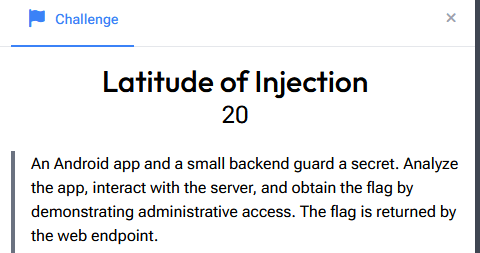
"An Android app and a small backend guard a secret. Analyze the app, interact with the server, and obtain the flag by demonstrating administrative access. The flag is returned by the web endpoint."
The name is the whole hint folded in half. "Latitude" → something location-based. "Injection" → an SQL-injection bug. The app is where you learn the secret; the website is where you spend it. Nothing in the app talks to the server — you do that part by hand once you know what to send.
Note on the flag: this challenge is per-instance, so your secret string and final flag bytes will differ from the ones shown here. The method is identical.
Step 0: What is an APK, and how do we look inside? (for first-timers)
An Android app (.apk) is just a ZIP file with a specific layout:
AndroidManifest.xml— the app's "table of contents": package name, screens, permissions.classes*.dex— the compiled code (Java/Kotlin turned into Dalvik bytecode).res/+resources.arsc— images, text strings, layouts.assets/— raw bundled files.
To read it we need two moves:
- Unzip it to see the raw files.
- Decompile the
.dexback into readable Java/Kotlin. The easiest tool is jadx (jadx-guigives you a clickable, searchable source tree).apktoolis handy too — it decodesresources.arscso you can read the text strings as plain XML.
That's the entire toolkit for this one. No debugger, no rooted phone.
Step 1: Triage the APK
Unzip first and see what we're dealing with:
mkdir loi && cd loi
unzip ../loi_v1.apk
Pull the package name and main screen out of the manifest (via apktool d loi_v1.apk, or any manifest viewer):
package     = com.ctf.loi
main activity = com.ctf.loi.MainActivity
permissions = INTERNET, ACCESS_COARSE_LOCATION, ACCESS_FINE_LOCATION
Two things already stand out:
- It asks for location permission → that's the "Latitude."
- It's a tiny custom app under
com.ctf.loi→ the interesting code is small and all ours to read.
Step 2: Decompile and Read the App Logic
Open the APK in jadx-gui and expand com.ctf.loi. A handful of classes matter: MainActivity, LocalDbHelper, ScreensKt (the UI), and Utils. Three findings carry the whole challenge.
Finding 1 — The "Injection" (a classic SQL bug)
LocalDbHelper.createUser() builds a query by gluing strings together instead of using parameters:
String q = "INSERT INTO users (name, email, is_admin) VALUES ('"
         + name + "', '" + email + "', 0);";
Log.i("LocalDbHelper", "VULN_INSERT: " + q);   // the dev literally labeled it
db.execSQL(q);
The is_admin column is hard-coded to 0. But because name/email are pasted straight into the SQL, you can inject and set is_admin = 1 yourself — e.g. an email of x', 1); -- closes the statement early and makes you an admin. That's the "administrative access" the brief wants.
The parallel lookup,
safeFindByName(), uses a parameterized?query — so login is safe; only sign-up is injectable. This contrast is the lesson: one line of string-concatenation is all it takes.
Finding 2 — The "Latitude" (a location gate)
MainActivity reads three numbers from the string resources and the home screen checks your GPS position against them:
l1  = 55.7558      (latitude)
l2  = 37.6173      (longitude)
al_r = 300000.0    (allowed radius, in metres)
Utils.distanceMeters(you, 55.7558, 37.6173) must be ≤ 300 000 m (300 km). Those coordinates are Moscow. So any request has to look like it's coming from near Moscow.
Finding 3 — The prize: "Privileged Info"
The admin screen's whole job is to reveal one secret string. When a user with is_admin = 1 is present, it displays the string resource named not_required7:
app/res/values/strings.xml
<string name="not_required7">ckdjN340OXQ3V1dKfmhNZjc3</string>
That ckdjN340OXQ3V1dKfmhNZjc3 is the admin-only "Privileged Info." You can reach it two ways:
- The intended way: use the SQL-injection from Finding 1 to make yourself admin, open the admin screen, and read it.
- The shortcut: since it's just a string resource, grep it straight out of the decoded resources:
apktool d loi_v1.apk -o out
grep -R "not_required7" out/res/values/strings.xml
Both give you the same value.
Step 3: Meet the Server — "Enter Secret & City"
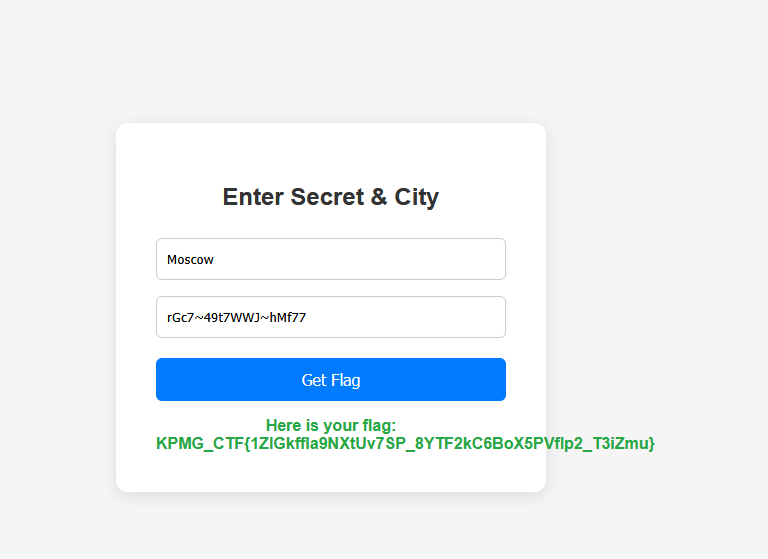
The web endpoint is a tiny form with two boxes and a Get Flag button:
- City — this is the Latitude gate from Finding 2. The backend geocodes the city and checks it's within 300 km of
55.7558, 37.6173. → EnterMoscow(distance 0, guaranteed pass). - Privileged Info — the admin secret from Finding 3.
So "demonstrating administrative access" = proving to the server that you dug the admin-only secret out of the app, and that you're in the right place.
Step 4: Decode the Secret (the small crypto twist)
If you paste ckdjN340OXQ3V1dKfmhNZjc3 in raw, it's rejected. Look at it again: fixed length, mixed case, alphanumeric — that shape screams Base64. Decode it:
echo 'ckdjN340OXQ3V1dKfmhNZjc3' | base64 -d
rGc7~49t7WWJ~hMf77
That decoded string — rGc7~49t7WWJ~hMf77 — is the actual "Privileged Info" the server wants. (The app stored it Base64-encoded so it isn't obvious in plain strings output.)
Step 5: Submit and Capture the Flag
Fill the form:
| Field | Value |
|---|---|
| City | Moscow |
| Privileged Info | rGc7~49t7WWJ~hMf77 |
Hit Get Flag:
Here is your flag:
KPMG_CTF{1ZlGkffla9NXtUv7SP_8YTF2kC6BoX5PVflp2_T3iZmu}
Flag captured. 🎉
Summary
| Step | Action | Result |
|---|---|---|
| 1 | unzip + read manifest | package com.ctf.loi; location permissions → "Latitude" |
| 2a | Decompile LocalDbHelper | string-concatenated INSERT → SQL injection → become admin |
| 2b | Read MainActivity / Utils | location gate: within 300 km of Moscow (55.7558, 37.6173) |
| 2c | Find admin screen secret | string resource not_required7 = ckdjN340OXQ3V1dKfmhNZjc3 |
| 3 | Inspect the web form | needs City (the gate) + Privileged Info (the secret) |
| 4 | Recognize + Base64-decode | ckdjN340OXQ3V1dKfmhNZjc3 → rGc7~49t7WWJ~hMf77 |
| 5 | Submit Moscow + decoded secret | flag returned by the endpoint |
Key Takeaways
- An APK is a ZIP — unzip and decompile.
jadxfor code,apktoolfor the text strings. Most "mobile" challenges are 90% reading. - String-concatenated SQL = injection, every time. The dev even logged it as
VULN_INSERT. Parameterized queries (?) are the fix, and the app's own safe lookup shows the contrast. - The app teaches, the server tests. Nothing in the app sends anything to the backend. Your job is to extract the right values from the app and present them yourself.
- Secrets are often one decode away. A fixed-length alphanumeric blob is usually Base64 — always try decoding before assuming a value is final.
- Read the challenge name. "Latitude of Injection" literally spelled out location gate + SQL injection before you opened a single file.
Flag: KPMG_CTF{1ZlGkffla9NXtUv7SP_8YTF2kC6BoX5PVflp2_T3iZmu} (per-instance — yours will differ)