Attack Paths - (Cortex Cloud) - Writeup
On this page
- 1.Challenge Overview
- 2.Answer Ledger
- 3.The Attack Path
- 4.Q1: Tracing The Rules That Generate Findings
- 5.Q2: Exploring Public Exposure Down To All The Hops
- 6.Q3: Identifying The IaC File Deploying Misconfigured Instance
- 7.Q4: Identification CIEM Blast Radius Through Highly Permissive Policies
- 8.Q5: Finding Other EC2s Misconfigured With Public Exposure
- 9.Q6: Vulnerabilities Triage
- 10.Q7: Failed Data Security Compliance Controls
- 11.Q8: Quick Remediations Empowering Analysts
- 12.Takeaways
Challenge Overview
| Event | Palo Alto Networks Cortex CTF 2026 |
|---|---|
| Scenario | Attack Paths: When Bad Posture Can Lead to Ecosystem Mayhem |
| Platform | Cortex Cloud |
| Questions | 8 (5 pts each) |
| Points | 40 |
| Asset | Cobra-Webserver (i-0ad7494eade1ba2d7) |
Everything centres on one EC2 instance in AWS account 343059098826, region us-east-1: Cobra-Webserver. Cortex Cloud chains its findings into an attack-path issue: data exfiltration risk due to a publicly exposed AWS EC2 instance with s3:GetObject and s3:ListBucket permissions and not configured to use IMDSv2.
Answer Ledger
| Q | Challenge | Answer |
|---|---|---|
| 1 | Tracing The Rules That Generate Findings | how-network |
| 2 | Exploring Public Exposure | vpc-0bad9 |
| 3 | Identifying The IaC File | nishantorg3433/finance-app-code/tools-iac/ec2.tf |
| 4 | CIEM Blast Radius | ec2-role-policy-3af162a |
| 5 | Other Exposed EC2s in the VPC | 5 |
| 6 | Vulnerabilities Triage | 110 |
| 7 | Failed Data Security Compliance Controls | 2 |
| 8 | Quick Remediations | the full !aws-ec2-enable-imdsv2-quick-action line |
The Attack Path
| Stage | Finding |
|---|---|
| Exposure | The instance is reachable from the internet through security group web-sg-83bfb9c_xpanse_ar_133. |
| Entry | 110 findings are both exploitable and fixable, led by Spring4Shell (CVE-2022-22965). |
| Credentials | IMDSv1 lets an SSRF read the role's credentials from 169.254.169.254. |
| Blast radius | The role's inline policy ec2-role-policy-3af162a has excessive permissions, including S3 read. |
| Liability | The asset fails GDPR Article 5 controls. |
| Fix | An analyst enforces IMDSv2 from the War Room with a one-line quick action. |
Q1: Tracing The Rules That Generate Findings
Issue 120486 flags Cobra-Webserver as exposed to the public internet. In the issue's evidence graph, open the Public internet exposure found posture finding. Its description names the rule that produced it.
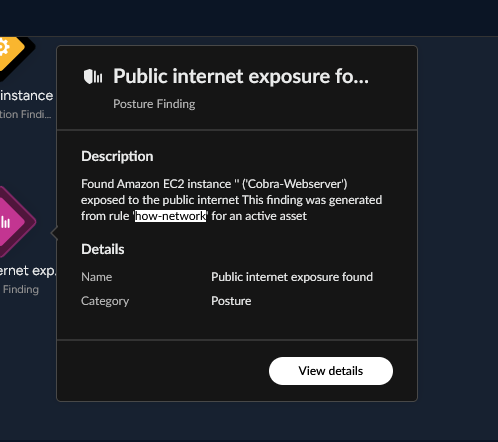
Flag: how-network
Q2: Exploring Public Exposure Down To All The Hops
Open the Cobra-Webserver asset and go to the Network tab. It lists the subnet, security group and NACL, and the Assets in the Same Network graph has the VPC at its centre. Clicking the VPC node gives the full ID, vpc-0bad9e7781711e61f; the flag takes the first five characters after the prefix.
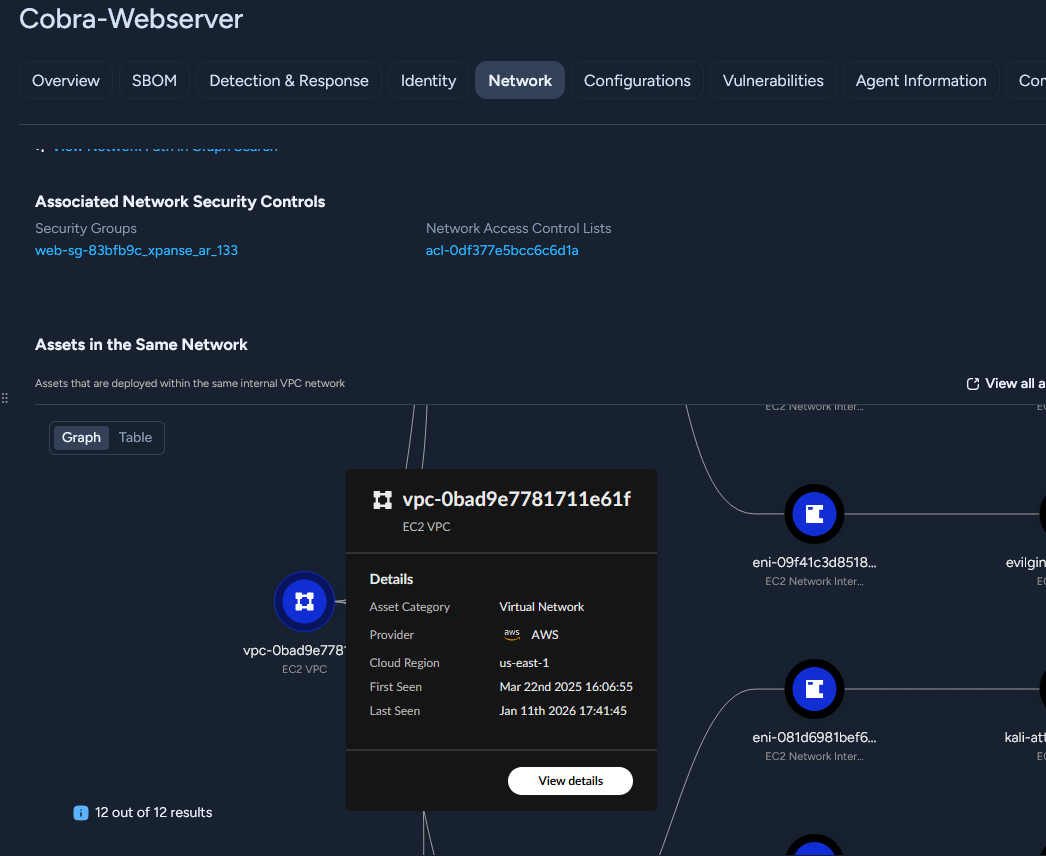
Flag: vpc-0bad9
Q3: Identifying The IaC File Deploying Misconfigured Instance
The SBOM tab lists software packages inside the instance and does not help here. The IaC Scanner finding does: posture issue #126707, "Ensure Instance Metadata Service Version 1 is not enabled" (rule APPSEC_AWS_79), traces the Terraform resource aws_instance.web_host, lines 1–31, to its repository and file. That is code-to-cloud tracing: the runtime finding points back to the code that created the resource.
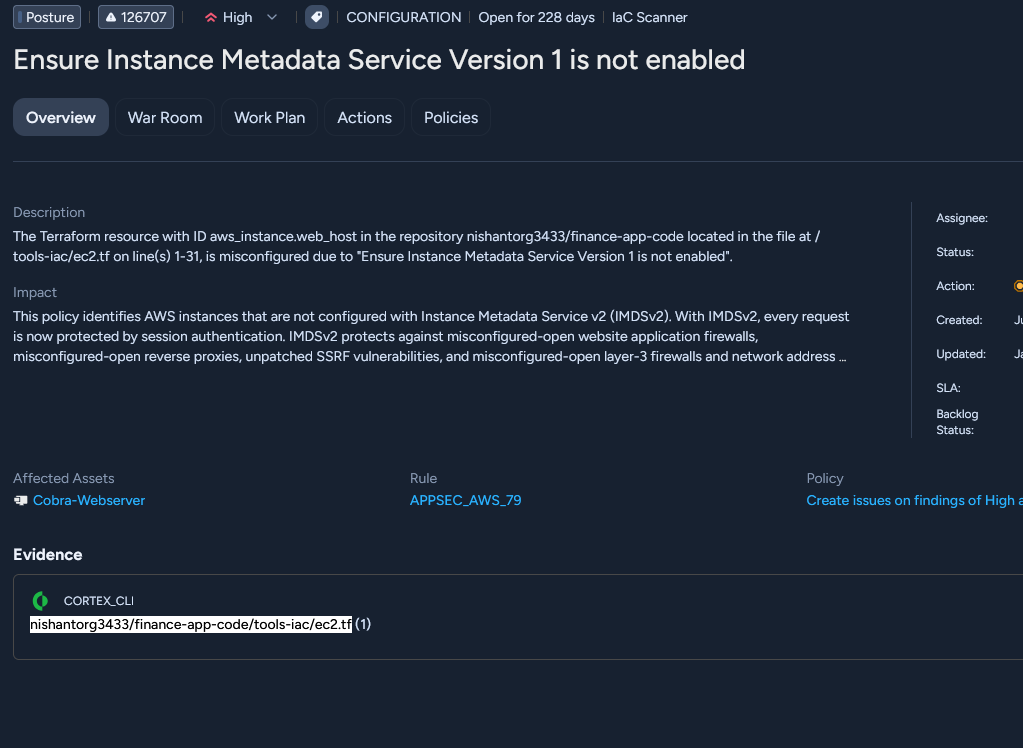
Flag: nishantorg3433/finance-app-code/tools-iac/ec2.tf
Q4: Identification CIEM Blast Radius Through Highly Permissive Policies
The asset's Identity tab is the CIEM view of the instance's IAM role. Its inline policy list has one entry, flagged for excessive permissions with Write, Read and two more access levels. If IMDSv1 leaks the role's credentials, these permissions are what the attacker inherits.
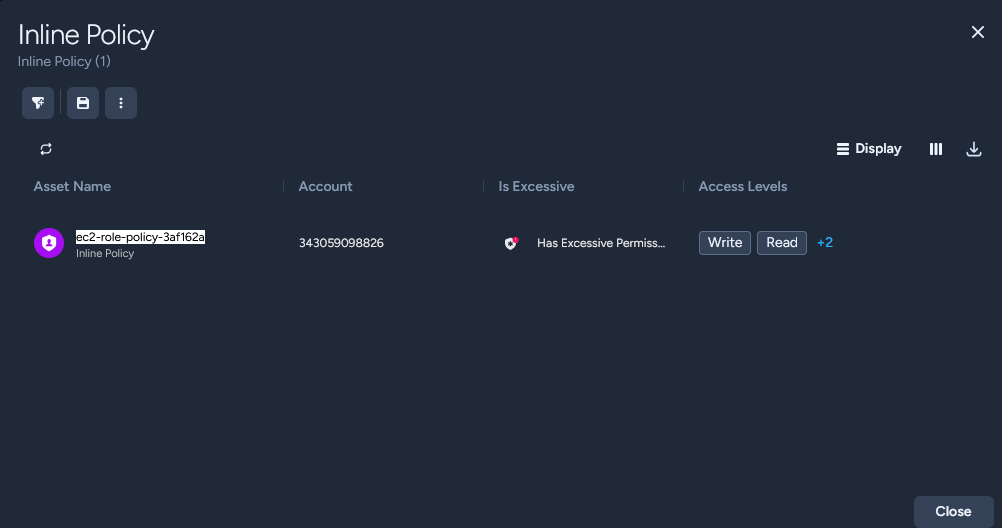
"Read Permissions" is an access level, not a policy name, so it is not the answer.
Flag: ec2-role-policy-3af162a
Q5: Finding Other EC2s Misconfigured With Public Exposure
Back on the Network tab, Assets in the Same Network returns 12 results: six EC2 instances and their six network interfaces. Instances reachable from the internet carry a small globe icon under their node. Five of the six have it.
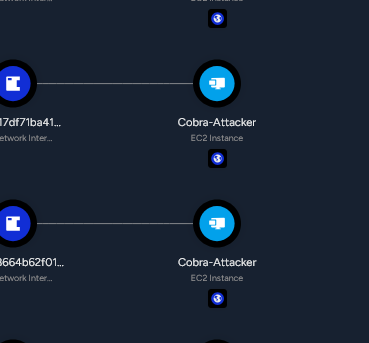
Flag: 5
Q6: Vulnerabilities Triage
On the asset's Vulnerabilities tab, filter Vulnerability Findings with Exploitable = Yes and Fix Available = Yes. The result count is the answer. It counts finding rows, so a CVE found in several packages appears more than once.
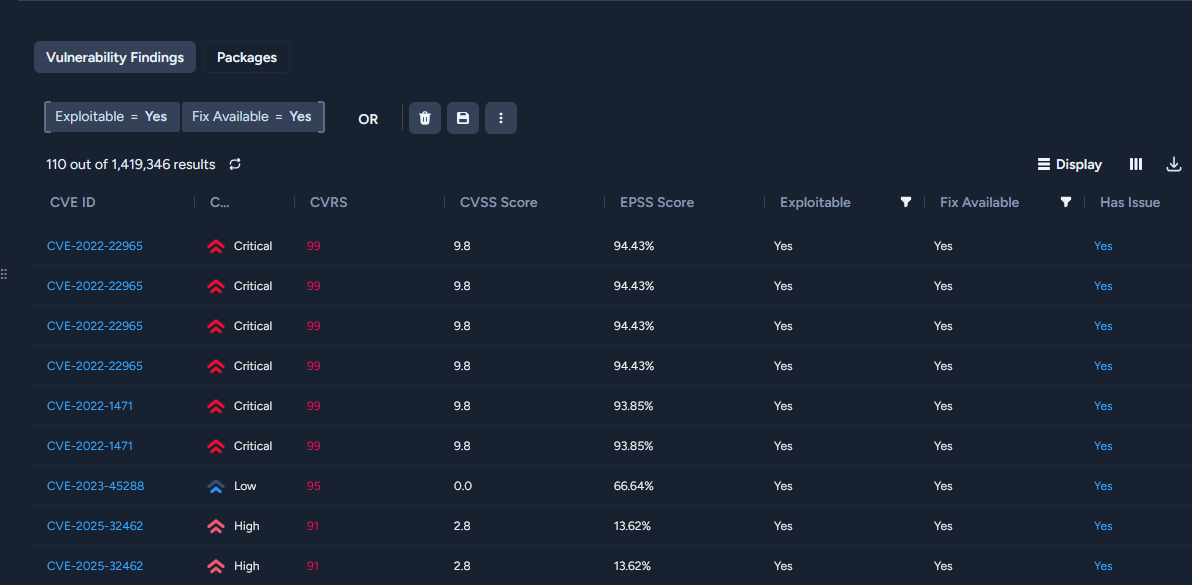
Flag: 110
Q7: Failed Data Security Compliance Controls
The asset's Compliance tab shows which standards it fails. Open the failed data security standard (GDPR), then the control Article 5, and switch to its Rules tab. Sorting by severity groups the Critical rules together; there are two.
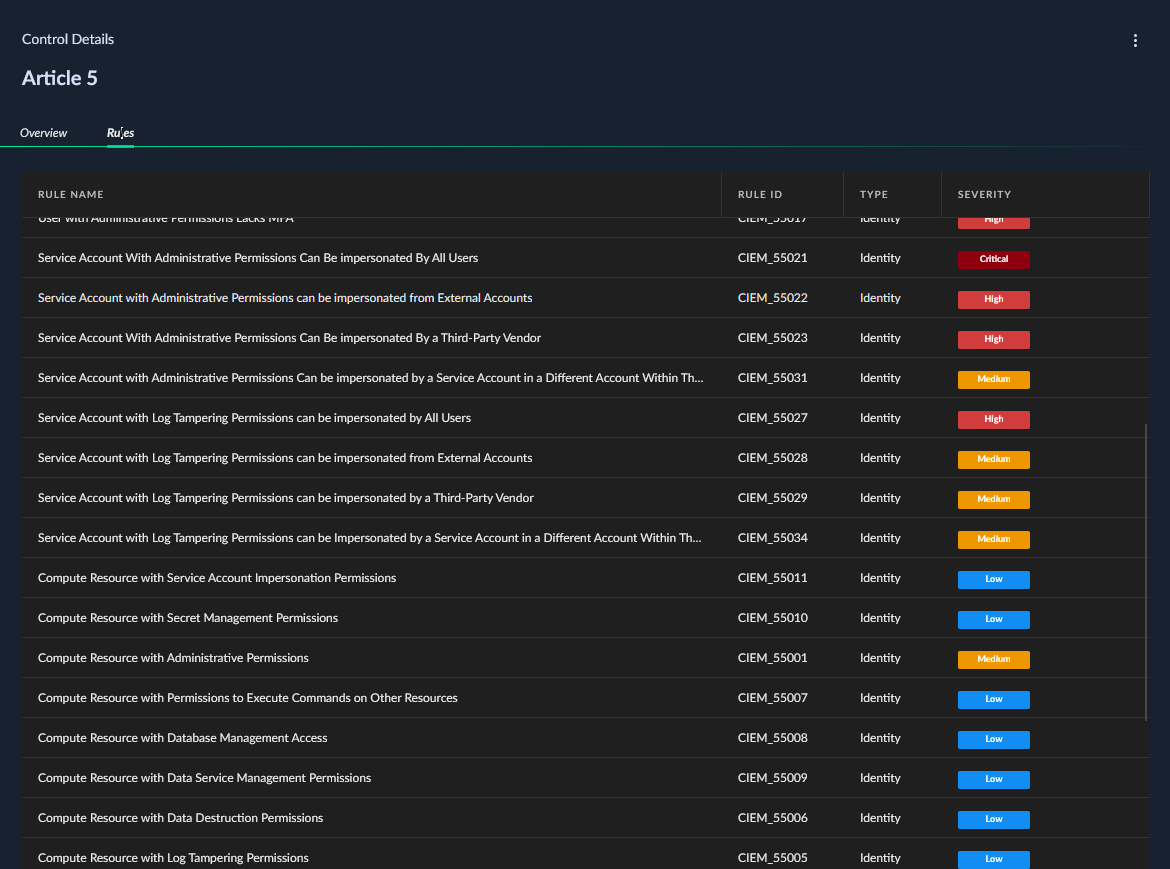
Flag: 2
Q8: Quick Remediations Empowering Analysts
Open the IMDSv2 issue, go to the War Room and tick Commands and Task results. An analyst ran the quick action on 27 January 2026 and DBot logged the executed command with every argument filled in, followed by "Successfully updated EC2 instance metadata for i-0ad7494eade1ba2d7". The http_tokens="required" argument is what enforces IMDSv2.
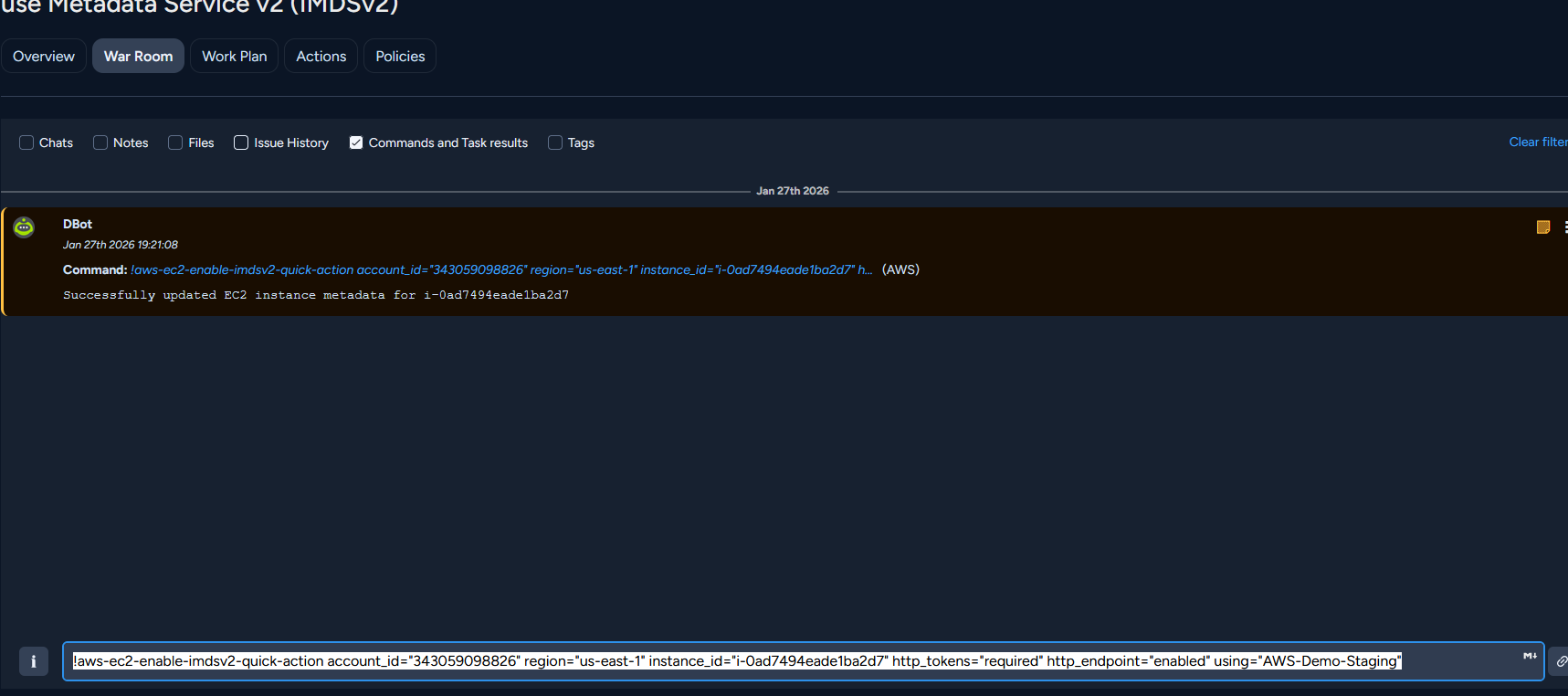
The templated version with ${asset.xdm.asset.realm} placeholders was rejected. The flag is the command as it actually ran:
!aws-ec2-enable-imdsv2-quick-action account_id="343059098826" region="us-east-1" instance_id="i-0ad7494eade1ba2d7" http_tokens="required" http_endpoint="enabled" using="AWS-Demo-Staging"
Takeaways
- An attack path is several routine findings that line up: public exposure, IMDSv1, a permissive role and exploitable CVEs.
- Fix it in code as well as in the cloud. The quick action patches the running instance, but
ec2.tfwill redeploy IMDSv1 until the Terraform setshttp_tokens = "required". - Look at the neighbours. Five of six instances in the VPC share the exposure.
- Small UI cues carry answers: the globe badge for exposure, the severity badge for compliance rules, the expanded command in the War Room.