
The "Dumb" Editor That Got Too Smart: When Feature Bloat Leads to RCE
Notepad was supposed to be the safe harbor of Windows utilities. Then Microsoft added Markdown, and things got complicated.
For nearly 30 years, notepad.exe was the gold standard of "dumb" utilities. It was a simple Win32-backed buffer for strings. It did exactly one thing: displayed text. Because of this simplicity, it was virtually impossible to exploit. If you opened a suspicious file in Notepad, you were safe. It didn't parse macros, it didn't run scripts, and it certainly didn't make network connections.
But in early 2026, that changed.
With the discovery of CVE-2026-20841, a Remote Code Execution (RCE) vulnerability with a CVSS score of 7.8, the humble Notepad has officially entered the "feature bloat to vulnerability" pipeline.
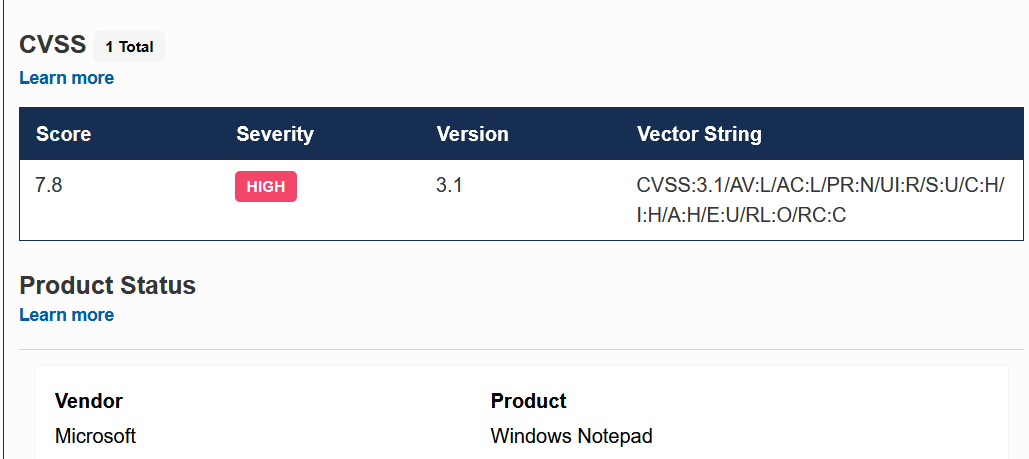 The official CVSS 3.1 score for CVE-2026–20841, rated High Severity at 7.8.
Here is a deep dive into what this vulnerability is, how a text editor became an attack vector, and how you can remediate it.
The Context: Why Does Notepad Even Have Vulnerabilities?
To understand the bug, we have to understand the history. For decades, Windows had two text tools:
- Notepad: For plain text.
- WordPad: For Rich Text Format (RTF).
Microsoft recently deprecated and removed WordPad. To fill the void for developers and power users, they began injecting new features into the modern (Microsoft Store) version of Notepad. The biggest addition? Markdown support.
What is Markdown?
Markdown is a lightweight markup language that allows you to represent formatted text using unformatted text. For example, if you type # Hello in a Markdown editor, it renders as a large Hello header. It allows you to transport "Word-like" documents without the file size bloat of Word documents.
Crucially, Markdown supports hyperlinks. And this is where the trouble begins.
The Vulnerability: CVE-2026-20841
The vulnerability lies in how the modern Notepad application parses and handles Uniform Resource Identifiers (URIs) within Markdown (.md) files.
When Notepad transformed from a raw text viewer to a Markdown renderer, it had to decide how to handle links. A standard link looks like this: [Google](https://google.com).
However, researchers found that Notepad failed to properly sanitize the file:// URI scheme.
The Mechanism
An attacker can create a malicious Markdown file containing a link that points not to a website, but to a local executable or a network resource.
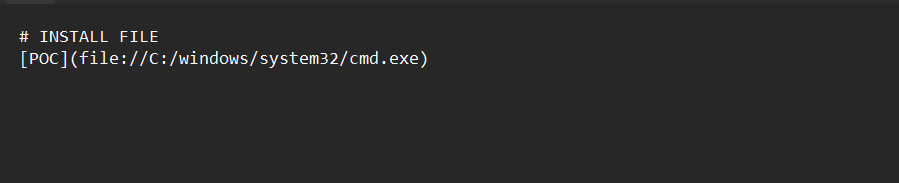 The raw content of the Markdown file, showing the unsanitized file:// URI scheme pointing to cmd.exe.
As seen in the Proof of Concept (PoC) above, the attacker formats a link that points directly to cmd.exe using the file:/// protocol.
When a user opens this .md file in Notepad, the application renders the text "POC" as a clickable link. If the user clicks it, Notepad passes that URI to the system. Because of the lack of sanitization, instead of opening a web browser, the system obeys the protocol and attempts to execute the binary.
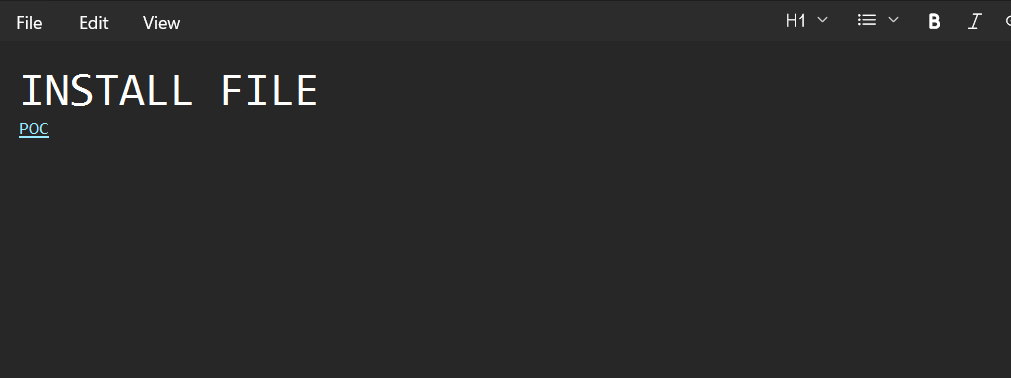 The malicious file opened in Notepad. The Markdown renders the "POC" link as harmless clickable text.
If an attacker uses a network path (e.g., pointing to an SMB share), they could potentially trick the user into downloading a payload or leaking NTLM hashes just by clicking the link.
The Reality Check: Is It Really That Bad?
There is a lot of Fear, Uncertainty, and Doubt (FUD) circulating on Twitter and Reddit regarding this bug. Let’s look at the nuance.
Is this a critical "zero-click" exploit? No. Is it a "High" severity issue? Yes (CVSS 7.8).
For this exploit to work, a specific chain of events must occur:
- The user must download a malicious
.mdfile. - The user must open it in Notepad (not VS Code or other default editors).
- The user must hold
Ctrland click the link.
The Warning Screen
Contrary to some early reports claiming "silent execution," modern Windows protections do trigger a warning prompt when the link is clicked.
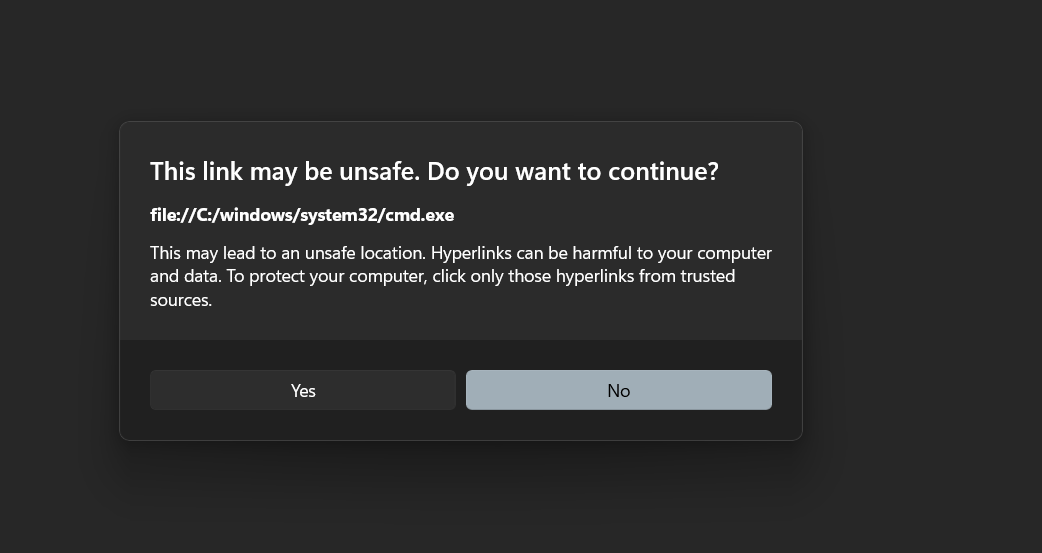 The security warning triggered by the exploit. While it prompts the user, "warning fatigue" often leads users to click "Yes" regardless.
As shown above, Windows attempts to warn the user that file://C:/windows/system32/cmd.exe might be unsafe. However, security professionals know that Warning Fatigue is real. Users are conditioned to click "Yes" to get to the content they want, especially if they believe they are just opening a text document.
If the user clicks "Yes," the command executes with the privileges of the current user.
The Real Risk
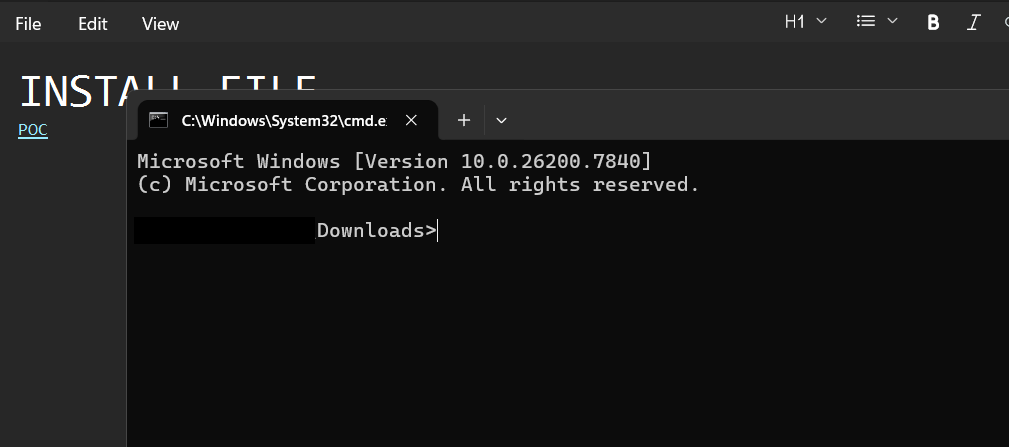 Successful exploitation. The cmd.exe shell is spawned directly from the Notepad process after the link is clicked
While it requires user interaction, the risk is that this breaks the mental model of Notepad. Users treat text files as harmless. If an HR employee receives a Candidate_Notes.md file, they don't expect it to be capable of launching a reverse shell.
The Philosophy: The Feature Bloat Pipeline
This vulnerability highlights a massive problem in modern software development: Feature Bloat.
We have reached the logical conclusion of adding features to utilities that didn't need them.
- Old Notepad: A dumb window. Secure by design because it did nothing.
- New Notepad: Renders Markdown, has tabs, integrates with Copilot AI, and connects to the internet.
From a Blue Team/Defender perspective, this is a nightmare. Five years ago, if notepad.exe tried to talk to the internet or spawn a child process, your EDR would flag it immediately as malware. Today? That’s just Notepad logging into your Microsoft account for AI assistance or rendering a Markdown link.
We have complicated the threat landscape by making our simple tools complex.
Remediation and Mitigation
1. The Patch
Microsoft has released a patch for the Store-based version of Notepad.
- Vulnerable Version: Prior to 11.2510.
- Fix: Open the Microsoft Store application and ensure Notepad is updated to the latest version.
- Note: The legacy
notepad.exe(System32) is not affected, only the modern Store app.
2. Zero Trust and "Ring Fencing"
Since we can't stop vendors from adding features, we must limit what those applications can do. This vulnerability is a perfect use case for Ring Fencing policies (using tools like ThreatLocker, AppLocker, or generic Firewall rules).
- Block Network Access: Does Notepad really need to talk to the internet? For 99% of corporate use cases, no. Block
notepad.exefrom making outbound network connections. - Block Process Spawning: Configure your endpoint protection to alert or block if
notepad.exeattempts to spawncmd.exe,powershell.exe, or other shells.
Conclusion
CVE-2026-20841 isn't the end of the world, but it is a wake-up call with a 7.8 severity score. It serves as a reminder that complexity is the enemy of security. When we demand that our simple text editors become comprehensive document rendering platforms, we inherit the vulnerabilities that come with that complexity.
Update your apps, warn your users about .md files, and stay vigilant.