How Attackers Use WebDAV to Deliver Malware Without Browser Warnings
Why malware no longer needs your web browser to breach your network-and how attackers are weaponizing legacy WebDAV protocols.
What if malware didn’t need your web browser to breach your network?
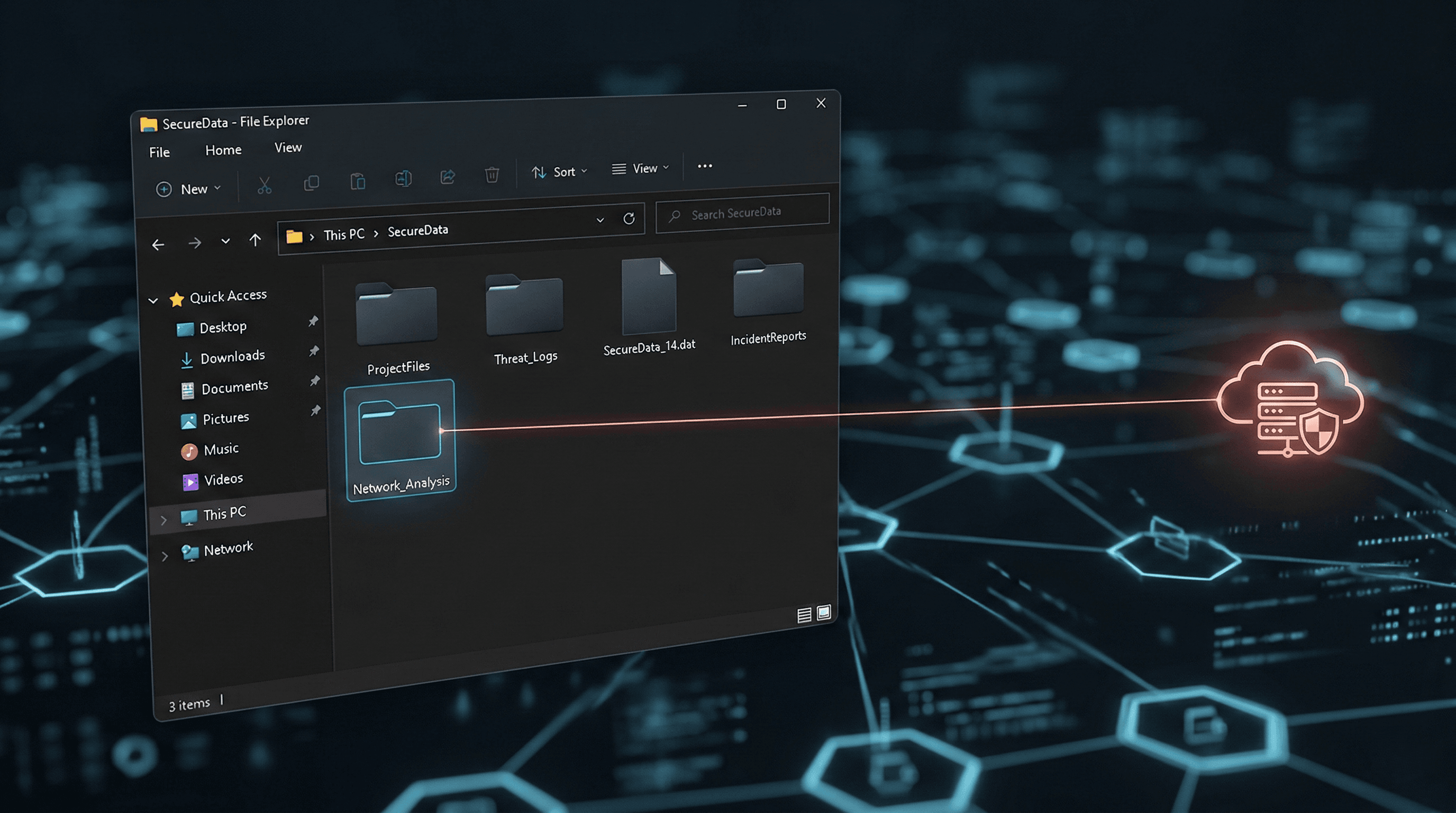
Threat actors are increasingly leveraging legacy Windows functionality as an alternative delivery mechanism, and it is hiding in plain sight: Windows File Explorer. By weaponizing a feature natively built into the Windows operating system, attackers are entirely bypassing the secure confines of Chrome, Edge, and traditional web filtering.
Instead of tricking users into downloading a file through a browser—where SmartScreen, download prompts, and browser-layer security stand guard—attackers are forcing File Explorer to connect directly to malicious remote servers. The result is a highly evasive malware delivery mechanism that slips right past standard endpoint defenses, turning the very tools users trust against them.
What Is WebDAV?
To understand how this attack works, we first need to look at the technology enabling it: WebDAV.
WebDAV stands for Web-based Distributed Authoring and Versioning. In plain English, it is an older extension of the standard HTTP protocol. Originally designed in the late 1990s, its purpose was to allow users to collaboratively edit and manage files on remote web servers.
Think of it like an early version of cloud storage. Instead of using a dedicated app like Dropbox or OneDrive, WebDAV allows you to map a remote server directly to your computer. When you connect to a WebDAV server, it does not look like a website. It looks exactly like a local folder on your standard C:\ drive. You can drag, drop, open, and edit files as if they were physically sitting on your desktop.
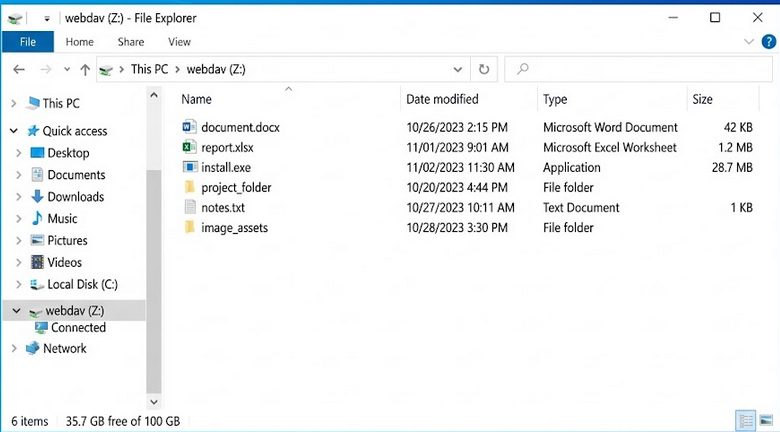 A mapped WebDAV network drive (Z:) displayed in Windows File Explorer. To the user, the remote server appears indistinguishable from a local folder, a key factor in the effectiveness of this attack technique.
Because of its utility in enterprise file-sharing environments, Microsoft built native WebDAV support directly into Windows File Explorer. While modern cloud solutions have largely replaced it, the protocol remains deeply embedded in the Windows operating system.
In November 2023, Microsoft formally deprecated native WebDAV support in Windows File Explorer. However, "deprecated" does not mean "removed." The functionality remains active and accessible on most modern Windows systems, quietly waiting in the background. It is this lingering legacy support that threat actors are now actively exploiting.
The Attack Flow
This is not your standard "click a link, download an executable" attack. By weaponizing Windows File Explorer, threat actors have built a sophisticated, multi-stage delivery chain.
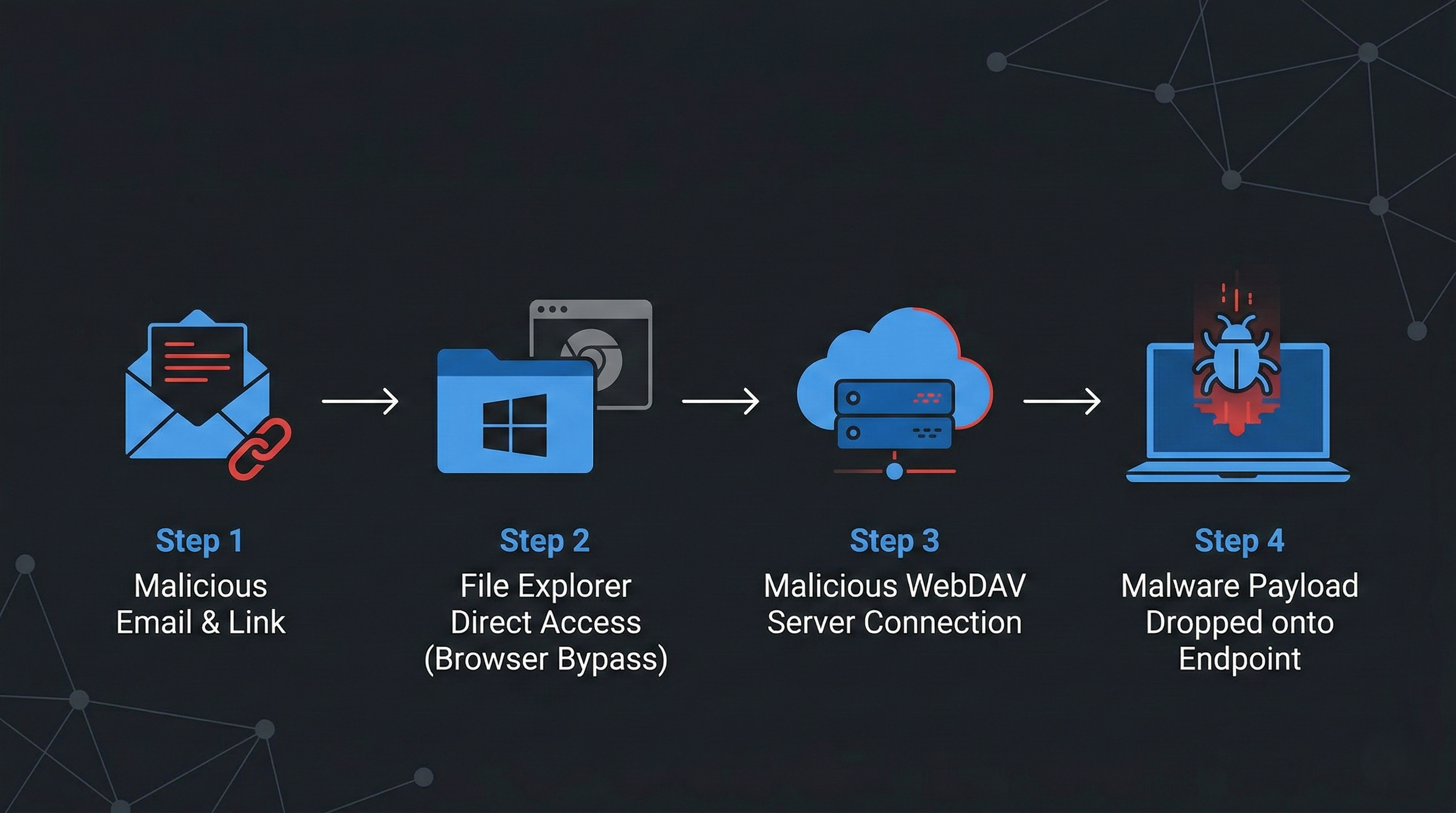 The WebDAV attack chain: Threat actors utilize malicious links to bypass traditional browser security, forcing Windows File Explorer to connect directly to remote servers for payload delivery.
Here is the step-by-step breakdown of how the exploit unfolds:
1. The Phishing Link
The attack typically begins with a phishing email. Current campaigns—heavily targeting European networks with German and English financial lures—contain malicious links or shortcut files. However, these are not standard https:// web links. Attackers use the file:// URI scheme or Windows UNC paths (e.g., \\exampledomain[.]com@SSL\DavWWWRoot\) to format the link.
2. File Explorer Takes the Wheel
When the user interacts with the link or shortcut, the operating system registers the specific URI scheme. Because it is formatted for file retrieval rather than web browsing, Windows does not hand the task to Chrome or Edge. Instead, it routes the command directly to Windows File Explorer (explorer.exe).
3. The Remote Server Mount
File Explorer silently reaches out over the internet (typically over HTTP port 80 or HTTPS port 443) to connect to the attacker-controlled WebDAV server. To mask their infrastructure, attackers are heavily abusing free Cloudflare Tunnel demo accounts (trycloudflare[.]com). This routes the malicious connection through legitimate Cloudflare infrastructure.
Crucially, because the browser is bypassed, the user sees absolutely no standard browser security warnings. The remote server simply mounts and appears as a standard local folder on the user's screen.
![Windows File Explorer displaying a remote WebDAV server connected via a trycloudflare[.]com UNC path. Note how it appears as a standard local network location. (Source: Cofense Intelligence)](/images/uploads/screenshot-2026-03-01-105537.png "Windows File Explorer displaying a remote WebDAV server connected via a trycloudflare[.]com UNC path. Note how it appears as a standard local network location. (Source: Cofense Intelligence)") Windows File Explorer displaying a remote WebDAV server connected via a trycloudflare[.]com UNC path. Note how it appears as a standard local network location. (Source: Cofense Intelligence)
Windows File Explorer displaying a remote WebDAV server connected via a trycloudflare[.]com UNC path. Note how it appears as a standard local network location. (Source: Cofense Intelligence)
4. Payload Delivery
Inside this folder, the user sees what appears to be a legitimate file—perhaps a PDF invoice, a .bat script, or a financial document. Because the interface looks identical to local storage, the user’s guard is down. Double-clicking the file executes the payload. Attackers are currently using this method to deploy multiple Remote Access Trojans (RATs), heavily featuring XWorm RAT, Async RAT, and DcRAT, granting them full unauthorized system control.
The "Zero-Click" Quirk
A notable technical anomaly makes this tactic highly evasive. Attackers frequently use .url shortcut files containing UNC paths.
If a user simply opens a local directory containing one of these malicious .url files, Windows Explorer automatically triggers a DNS lookup to resolve the icon or file metadata. This inadvertently sends a TCP SYN packet out to the attacker’s infrastructure. Even if the user never clicks the malicious file, the attacker is instantly notified that their payload has landed on an active machine.
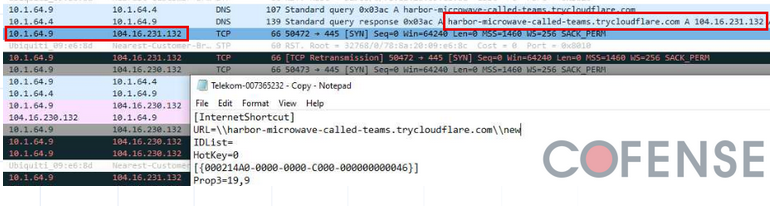 A URL shortcut file containing a Windows UNC path triggers an automatic DNS resolution and outbound network traffic just by existing in an open directory. (Source: Cofense Intelligence)
Why Traditional Defenses Fail
For Security Operations Center (SOC) analysts, this attack vector represents a significant blind spot. Traditional defenses are failing here because they are looking in the wrong place.
- Browser-Layer Bypass: Defenses like Microsoft SmartScreen, Google Safe Browsing, and standard browser download prompts rely on the browser handling the traffic. When
explorer.exetakes over, those safety nets are bypassed entirely. - Web Filtering Evasion: Because threat actors are using Cloudflare Tunnels, the outbound network traffic looks like standard HTTPS communication to a legitimate Content Delivery Network (CDN). It blends perfectly into the noise of daily enterprise web traffic.
- EDR Blindspots: Opening a remote file via
explorer.exeusing a legacy protocol is technically legitimate system behavior. Unless the EDR is specifically tuned to look for WebDAV abuse orexplorer.exespawning suspicious child processes from UNC paths, the initial access phase can slip by undetected. - Human Psychology: Security awareness training teaches users to be wary of web downloads. But when a window opens that looks exactly like a local corporate file share, human psychology defaults to trust. The user perception is simply, “It looks like a folder, so it must be safe.”
Who Is Most at Risk?
This specific attack vector poses the highest risk to environments that fit the following profiles:
- Enterprises with WebClient enabled by default: Organizations that have not actively disabled the WebClient service via GPO are inherently vulnerable to WebDAV exploitation.
- Organizations with limited outbound traffic inspection: Security stacks that do not rigorously inspect outbound HTTP/HTTPS traffic—especially to ubiquitous CDNs like Cloudflare—will miss the command-and-control communication.
- Remote workforce endpoints: Devices operating outside the traditional corporate network perimeter are highly susceptible if they lack strict host-based execution policies.
- SOCs relying heavily on browser telemetry: Teams that depend primarily on browser logs for initial access detection will miss the payload delivery entirely, as the event occurs at the OS level.
MITRE ATT&CK Mapping
To integrate this threat into your intelligence frameworks, this campaign maps directly to the following MITRE ATT&CK techniques:
- T1566.002 – Phishing: Spearphishing Link (Initial Access)
- T1059.005 – Command and Scripting Interpreter: Visual Basic (Execution via
.wshpayloads) - T1218.011 – System Binary Proxy Execution: Rundll32 (Defense Evasion via shortcuts)
- T1071.001 – Application Layer Protocol: Web Protocols (Command & Control)
- T1105 – Ingress Tool Transfer (Command & Control)
Detection & Defense Recommendations
Relying solely on legacy AV is a losing battle against this technique. Security teams must proactively hunt for the specific behaviors associated with WebDAV abuse.
- Disable the WebClient Service: The WebClient service in Windows is what enables WebDAV support. If your organization does not actively rely on WebDAV for legacy file shares, disable the WebClient service entirely via Group Policy (GPO). This effectively neutralizes the attack vector.
- Alert on Suspicious UNC Paths: Configure EDR solutions to trigger alerts on
.urland.lnkfiles containing theDavWWWRootkeyword or the@SSLmodifier in their paths. - Monitor Outbound WebDAV Connections: Create SIEM alerts for unusual network activity originating from
explorer.exe. specifically, look for HTTP/HTTPS traffic routing to unexpected domains, especially*.trycloudflare.com. - Monitor Child Processes: Alert on instances where
cmd.exe,powershell.exe, orwscript.exeare spawned directly fromexplorer.exewith command-line arguments referencing remote network paths. - Enforce Execution Policies: Implement strict application control policies to prevent the execution of scripts (like
.wsh,.vbs, or.bat) from network-mounted drives.
Analyst Insight
This technique represents a broader shift in attacker tradecraft. As browser security mechanisms become more effective and user awareness improves, adversaries are redirecting their efforts toward operating system-native components that sit outside the traditional web security stack. The attack surface is no longer just the browser — it is the operating system itself.
The Bigger Picture
This campaign is a textbook example of modern "Living off the Land" (LOTL) techniques colliding with legacy protocol abuse.
Threat actors are increasingly abandoning custom malware droppers in favor of using the operating system's built-in tools against itself. By hijacking features that have sat dormant but active in Windows for decades, attackers are drastically reducing their footprint and maximizing their evasion capabilities. Furthermore, this tactic highlights a broader risk: if WebDAV can be abused this easily, other legacy enterprise protocols like FTP and SMB are equally ripe for exploitation.
As network perimeters harden, attackers will continue to look for the path of least resistance. They are no longer just trying to break through the front door; they are actively abusing functionality that was never designed with modern threat models in mind.
"The most dangerous attacks today don’t drop obvious malware. They abuse what your system already trusts."