Wazuh SIEM/XDR Home Lab
Problem Statement
Building effective defense strategies requires more than theoretical knowledge; it requires a "live fire" environment to understand how attacks manifest in logs. This project demonstrates the end-to-end deployment and configuration of a comprehensive Security Operations Center (SOC) using the open-source Wazuh SIEM/XDR platform.
The goal was to build a multi-machine virtual lab to simulate and defend against real-world security threats, involving extensive troubleshooting of networking, service configurations, and rule logic to create a stable, fully functional security monitoring environment.
Lab Architecture
The lab was built using Oracle VirtualBox and consists of four virtual machines on a dual-homed network. The architecture ensures isolation while maintaining management access.
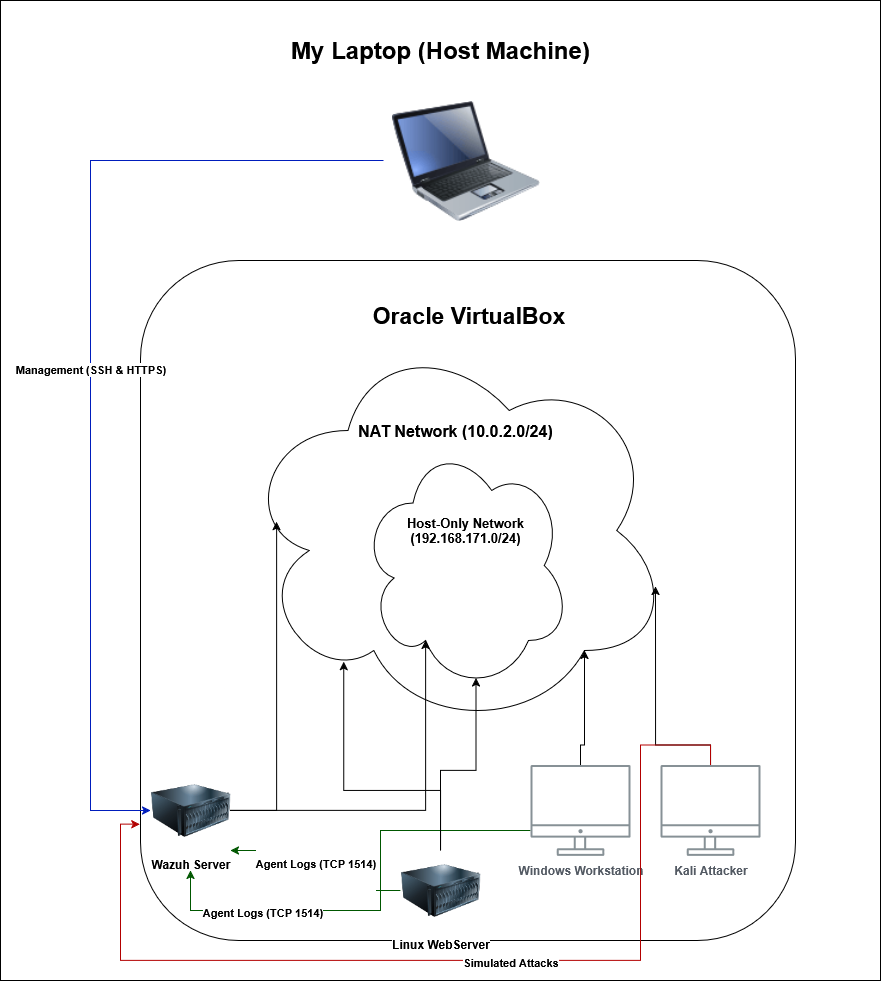 Network Diagram of VirtualBox Setup including Wazuh Server, Windows Endpoint, Linux Endpoint, and Kali Attacker
Infrastructure Components
- Wazuh Server: Ubuntu Server running the central Wazuh manager, indexer, and dashboard.
- Windows Endpoint: A Windows 11 Pro machine acting as a corporate workstation.
- Linux Endpoint: An Ubuntu Server, acting as a company server.
- Attacker Machine: A Kali Linux instance used to simulate threats.
Threat Model & Core Capabilities
The environment was engineered to detect specific phases of the Cyber Kill Chain:
1. Advanced Endpoint Monitoring (Sysmon)
I enhanced endpoint visibility on the Windows agent by integrating Sysmon. This allowed for the detection of granular system activity often missed by standard logging.
To simulate a high-fidelity detection for a common threat vector, I authored a custom rule to generate a high-priority alert whenever PowerShell was executed.
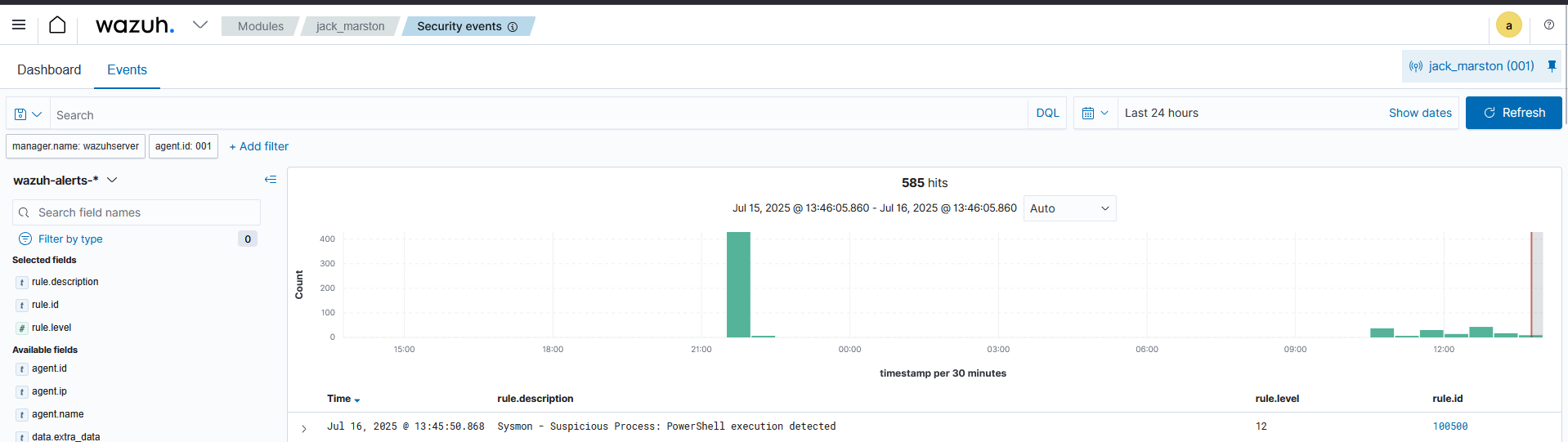 Wazuh Alert Dashboard showing High Severity Sysmon Event
View Custom Rule (local_rules.xml)
<!-- Custom rule to force alert on PowerShell start -->
<group name="sysmon,">
 <rule id="100500" level="12">
   <if_group>sysmon_event1</if_group>
   <field name="win.eventdata.image" type="pcre2">(?i)powershell\.exe</field>
   <description>Sysmon - Suspicious Process: PowerShell execution detected</description>
   <group>pci_dss_10.6.1,pci_dss_11.4,gdpr_IV_35.7.d</group>
 </rule>
</group>
2. Proactive Vulnerability Detection (FIM)
To protect critical assets, I configured File Integrity Monitoring (FIM) to provide instant alerts for unauthorized file modifications. After initial troubleshooting revealed a persistent configuration sync issue, I successfully pivoted to a direct, local configuration on the agent's ossec.conf file to monitor the user's home directory.
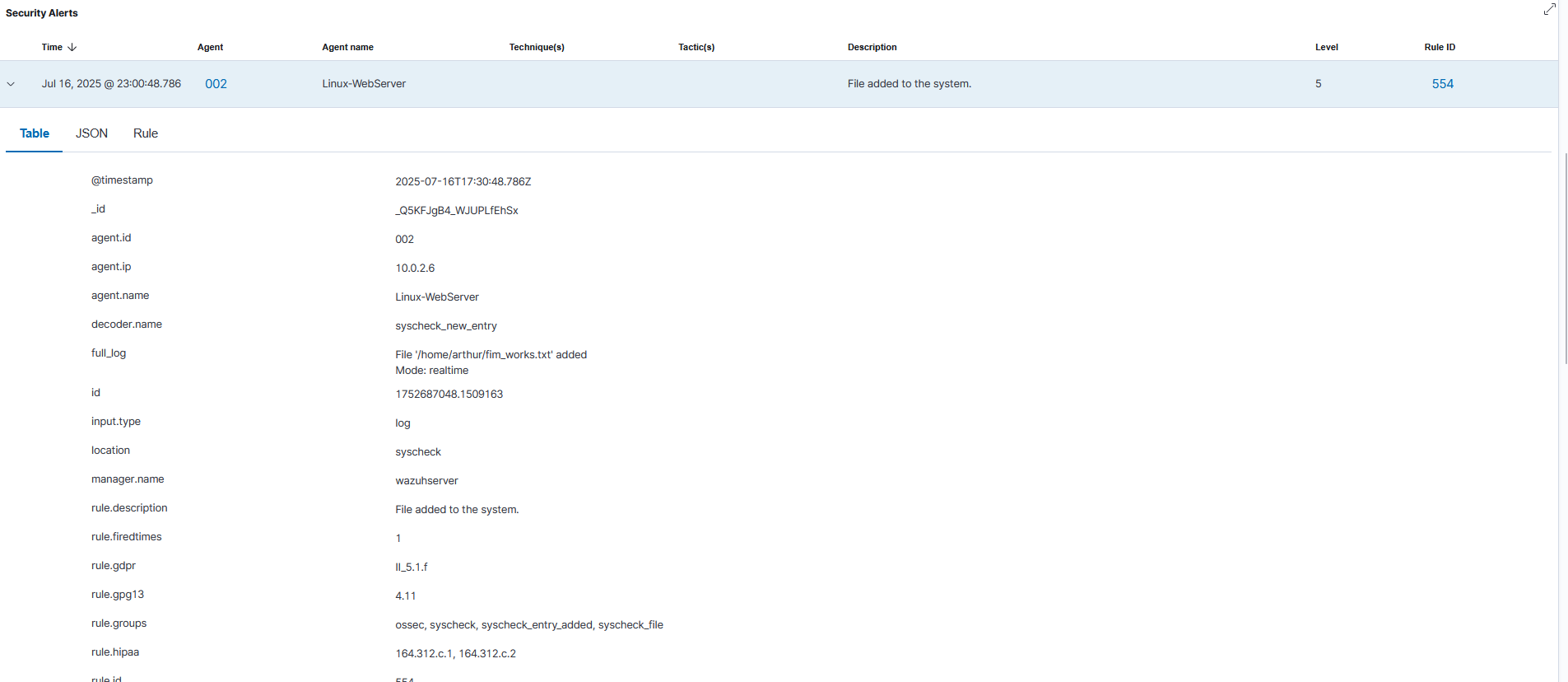 File Integrity Monitoring Alert Triggered
3. Threat Intelligence Integration
I integrated the Wazuh server with the VirusTotal API. This automatically checks the hash of any new file detected by FIM against VirusTotal's database of known malware, transforming a low-context "File Modified" alert into an actionable, high-confidence "Malware Detected" event.
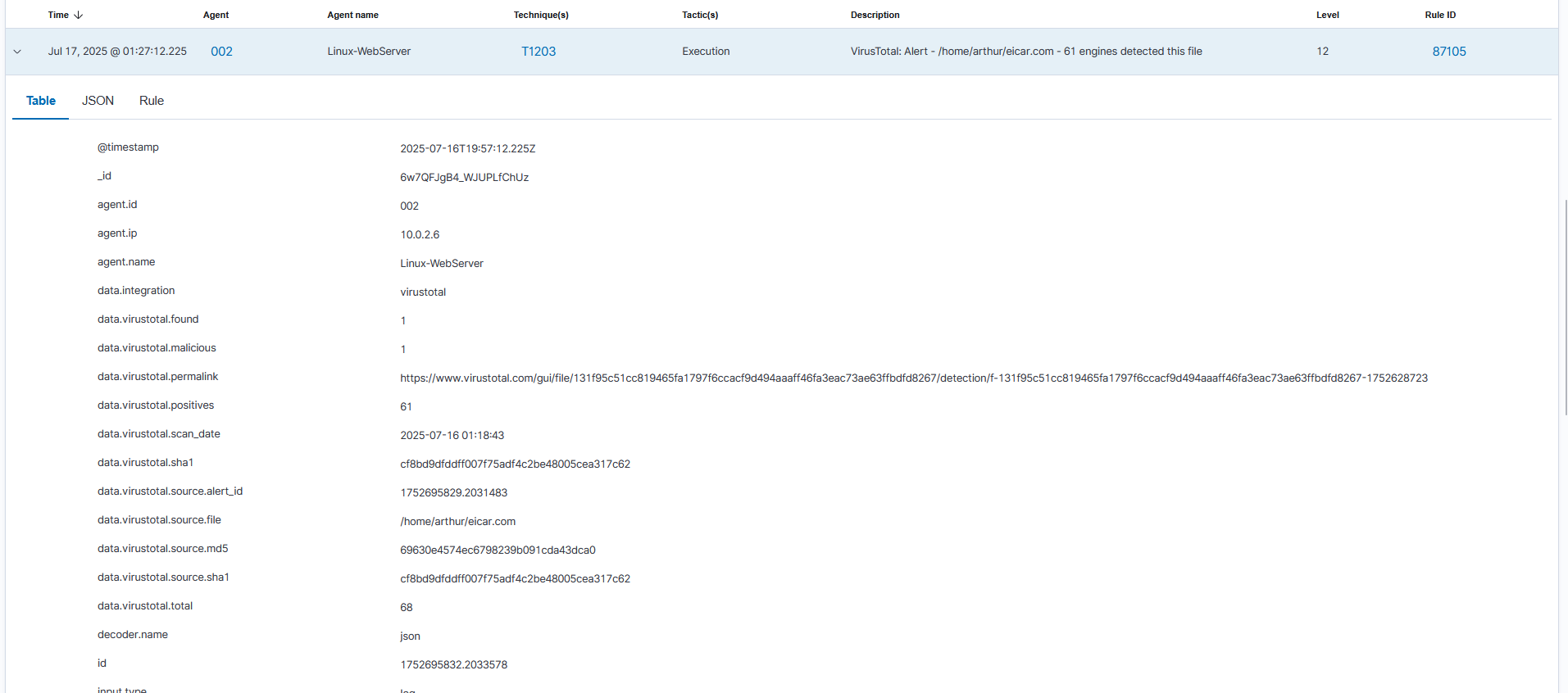 VirusTotal API Integration Logs
Grand Finale: The Automated Kill Chain
This final demonstration showcases a complete, automated "Detect and Respond" workflow using a classic brute-force attack scenario. I configured an Active Response to automatically block the source IP of an attacker after multiple failed SSH login attempts.
The Scenario
An attacker (Kali Linux) attempts to gain access to the Linux-WebServer by launching an SSH brute-force attack.
1. The Attack (Before)
The attacker has full connectivity and can successfully ping the target machine.
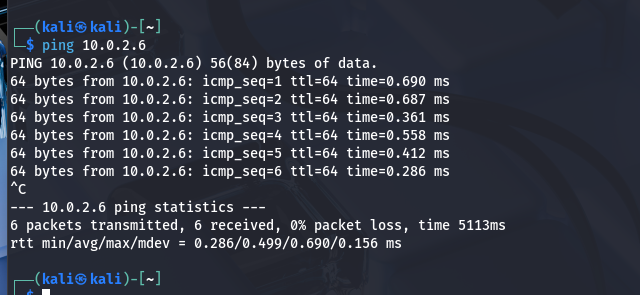 Attacker Machine successfully pinging target
2. Detection and Response
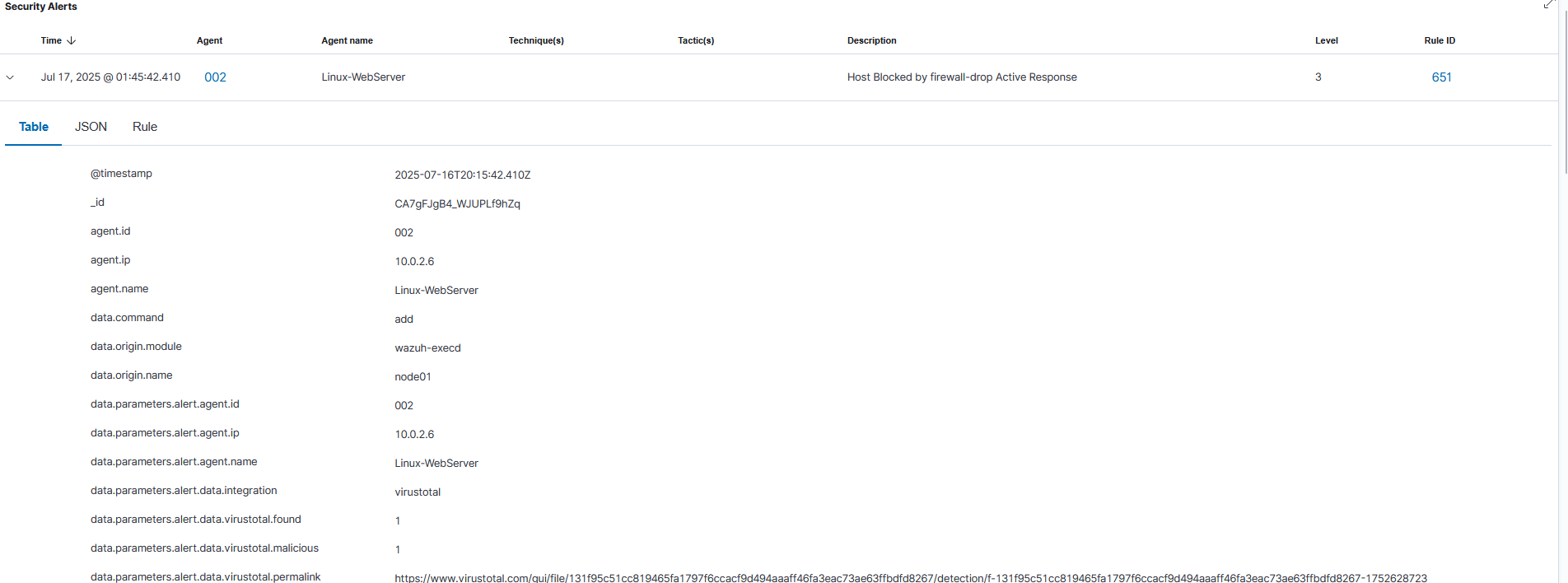
Wazuh's log analysis engine detects the multiple failed SSH login attempts from the same source IP, triggering a Level 10 alert (Rule ID 2502). This alert immediately triggers a pre-configured Active Response rule, which executes the firewall-drop script on the target agent to block the attacker's IP address.
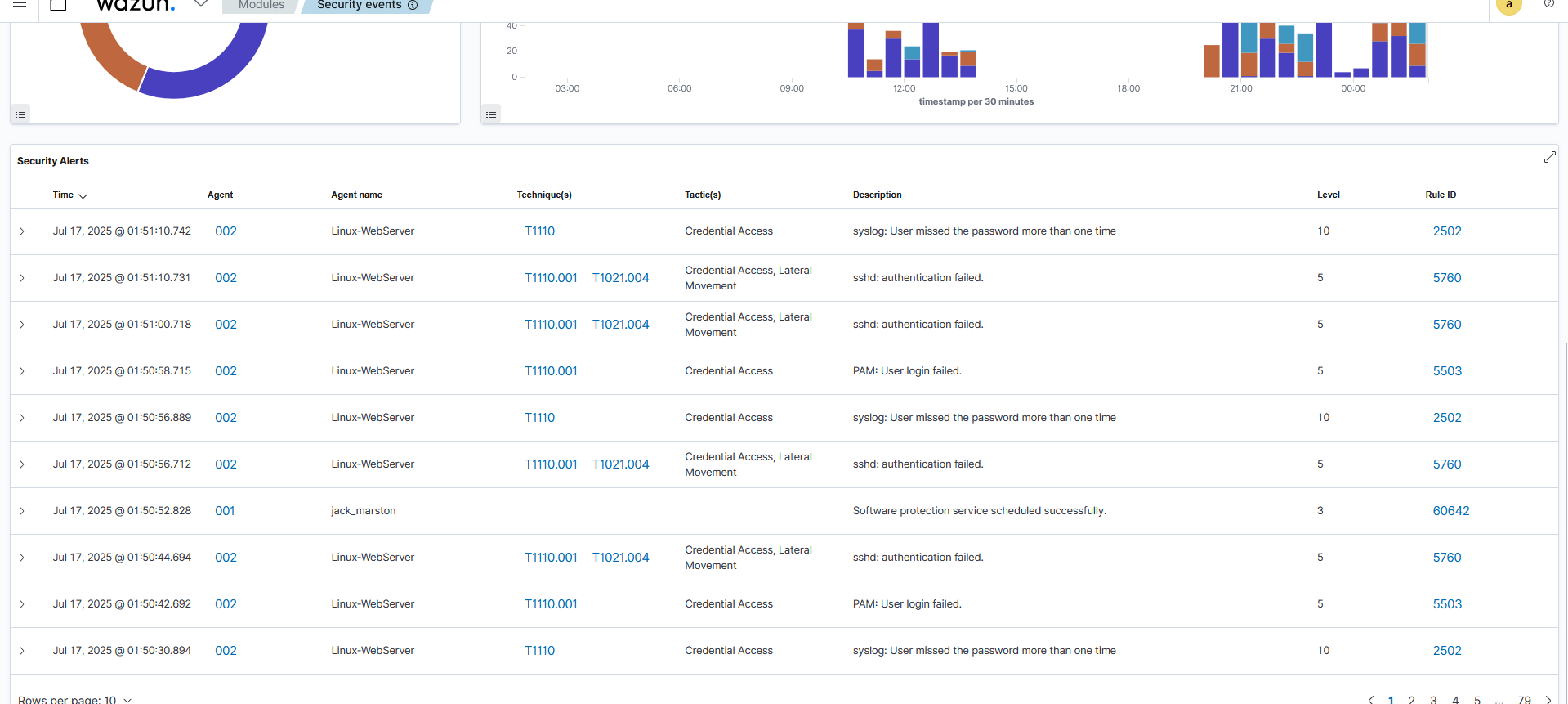 Active Response Log showing Block Action
3. The Result (After)
The attacker's IP is now blocked at the firewall level on the Linux-WebServer. All further connection attempts from the attacker fail.
 Attacker Machine getting connection refused
Future Improvements
This lab provides a strong foundation for further expansion. Future work includes:
- SOAR Integration: Integrating a platform like Shuffle or TheHive to automate ticketing and case management.
- Cloud Expansion: Deploying a Wazuh agent on an AWS EC2 instance to monitor cloud workloads.
- Lateral Movement: Developing more complex attack chains involving lateral movement and data exfiltration to test more advanced correlation rules.